
Google handles about 91% of worldwide search, and Bing about 5%, according to StatCounter’s October 2026 data. The gap narrows on desktop, where Bing reaches 15% worldwide and 18.8% in the United States.
Most stores look at the worldwide number and skip Bing Shopping. Its audience, click costs, and feed rules differ from Google’s, though, and for some catalogs those differences mean cheaper sales.
So are Bing Shopping ads worth it? Usually yes, if your Google Shopping account already makes money, many of your buyers shop on desktop, and your conversion tracking is reliable. For mobile-first or impulse-buy products, the extra setup rarely pays off.
This guide compares the two platforms, shows where the ads appear and which stores they suit, and lays out a 30- to 60-day test to run before you commit more budget.
What Are Bing Shopping Ads?
Bing Shopping ads, now officially Microsoft Shopping ads and often called Bing product ads, are product listings with an image, price, and store name. They appear when people search for products on Bing and Microsoft’s partner sites. Bing Ads was renamed Microsoft Advertising in 2019, but many advertisers still search for the old name.
Bing Shopping campaigns work much like Google Shopping. You upload a product feed to Microsoft Merchant Center (formerly Bing Merchant Center), your products show up when people search for what you sell, and you pay only when someone clicks.
How It Differs from Google Shopping
Bing gives you a smaller pool of traffic from a different audience, often at a lower CPC. Whether that adds up depends on your products and margins.
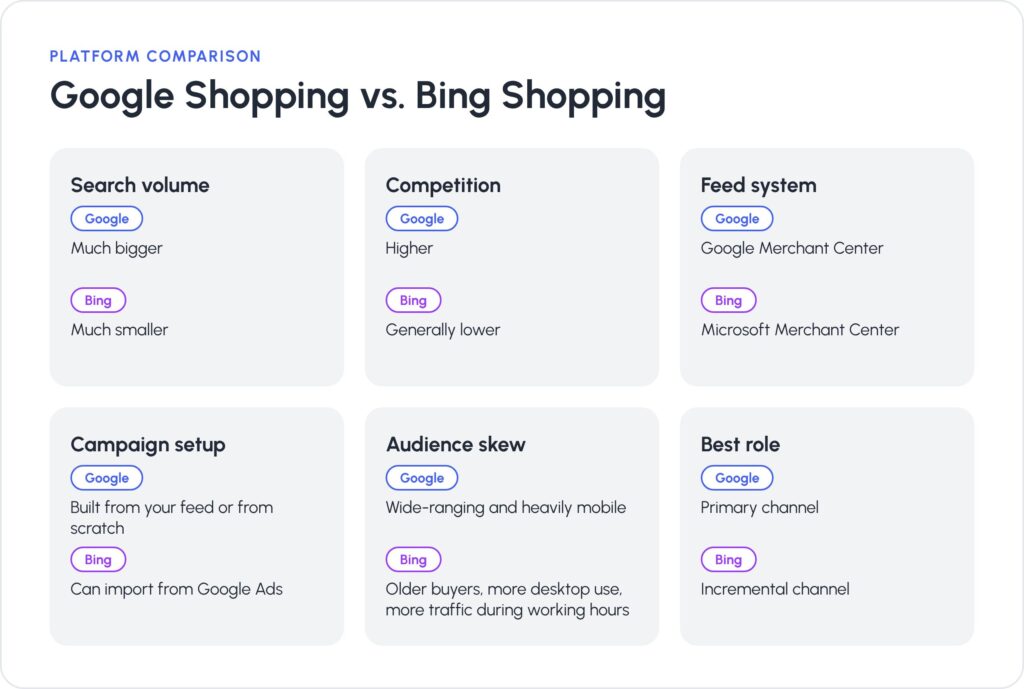
- Search volume. Google sends far more searches, so it will usually carry most of your shopping traffic. Bing’s audience is smaller, which means fewer impressions and clicks, so it works best as an extra channel.
- Competition. Fewer advertisers compete on Bing, so clicks are often cheaper. Lower volume and a different audience can also change conversion rates, so judge the channel on ROAS or CPA, not on CPC alone.
- Feed system. Microsoft Merchant Center is separate from Google’s, with its own policies and attribute requirements. A well-optimized Google feed is a good starting point, but expect some disapprovals on the first upload and fix them before you judge results.
- Campaign setup. The Google Ads import in Microsoft Advertising saves time, but treat what it brings over as a first draft. Check bids, budgets, locations, device targeting, and negative keywords before anything goes live.
- Audience skew. Google’s audience is broad and mobile-heavy. Microsoft’s skews older and more desktop-based, with more traffic during working hours. Your own device and time-of-day reports will show whether your buyers fit that profile.
- Best role. For most stores, Google stays the primary channel. Bing plays an incremental role: it adds orders Google doesn’t capture, at a CPA your margin can still cover.
Where Do Bing Shopping Ads Appear?
Bing Shopping ads run across Microsoft’s search network, so one campaign can reach shoppers in several places:
- Bing search results and the Shopping tab. Product ads show above or beside the regular results when someone searches for a product, and on Bing’s dedicated Shopping tab.
- Partner search engines. Yahoo, AOL, and DuckDuckGo show ads from Microsoft Advertising, so your products can appear there too.
- Microsoft’s own products. Product ads can also appear in Microsoft Edge, on MSN, and inside some Microsoft Copilot answers, especially with Performance Max campaigns.
Products approved in Microsoft Merchant Center can also show for free on the Bing Shopping tab, similar to Google’s free listings. Google is moving the same way with ads inside AI Overviews and AI Mode, so AI answers are becoming a shopping placement on both platforms.
Who Should Use Bing Shopping Ads?
Bing Shopping works better for some catalogs than others. Price point, device habits, and data quality matter most.
Strong Fits
- Higher-priced products. A bigger order value can make Bing’s smaller audience worthwhile, since each sale brings in more revenue. Check this against your own average order value, not a rule of thumb.
- Desktop-heavy categories. Professional tools, software accessories, office and home office equipment, and work-related gifts are typical examples.
- B2B and business buyers. People who research purchases during the workday are more likely to use Bing.
- Brands with clean data. If you already track purchases, margins, and returns accurately, you can judge a new channel quickly.
Weaker Fits
- Mobile-first and impulse products. Fashion, beauty, and low-cost accessories sell through scrolling and discovery, which social platforms handle better.
- Visual-discovery brands. If your sales depend on photos and videos that shoppers find on social platforms, Bing’s limited reach may not justify the setup time.
- Very niche categories. If few people search for your products on Bing, even a well-built campaign will barely spend.
When to Test Bing Shopping
Start a test when all four of these are true:
- Your Google Shopping account is already profitable. If it isn’t, fix the offer, feed, and landing pages first. A second platform will only copy what is already broken, and an eCommerce Google Ads audit will show you where to start.
- Your products are a higher-consideration purchase, and your buyers browse on desktop. Impulse and mobile-first products usually do better on social platforms.
- Your feed is clean and your conversion tracking is reliable. A thin feed leads to disapprovals, and unreliable tracking makes good traffic impossible to tell apart from bad traffic.
- Your budget is large enough to split across two platforms. On a tiny budget, both may stay too thin to learn anything.
How to Set Up and Test Bing Shopping
Most of the work happens before the first click. Set up tracking and the feed first, then run the test long enough to trust the numbers.
Set Up the Account and Feed
- Install the UET tag first. Add Microsoft’s Universal Event Tracking (UET) tag to every page, set conversion goals that match the ones you use in Google Ads, and place a test order to confirm purchases are recorded. Spend nothing until this works.
- Create a Microsoft Merchant Center store. Verify your domain with the UET tag or Bing Webmaster Tools. If you use the tag, it needs to record at least 50 events before the domain shows up as an option. Then import products from Google Merchant Center or upload a feed, and schedule a daily import so prices and stock stay in sync.
- Clean up the feed. Review every warning and disapproval, then check four things: titles name the brand, product type, and key attributes; images meet the specs and show the product accurately; prices, availability, and shipping match your website; and GTINs, brand, and MPN are filled in where your category needs them.
- Import your Google Shopping campaigns and check them. The import only brings Shopping campaigns over if a Microsoft Merchant Center store already exists. Before launch, review any settings that may not have transferred exactly.
- Start with your best sellers. Pick products that already sell well on Google Shopping, then expand once they prove themselves on Bing.
- Budget for Bing’s volume, not Google’s. Set the daily budget from the traffic Bing can actually deliver and adjust once you see impression share. Keep the test budget big enough to learn from and small enough to lose without harm.
- Choose your success metric before launch. Measure ROAS or CPA against your target.
A fair test answers one question: does Bing Shopping add profitable sales that Google doesn’t already capture?
Run the Test
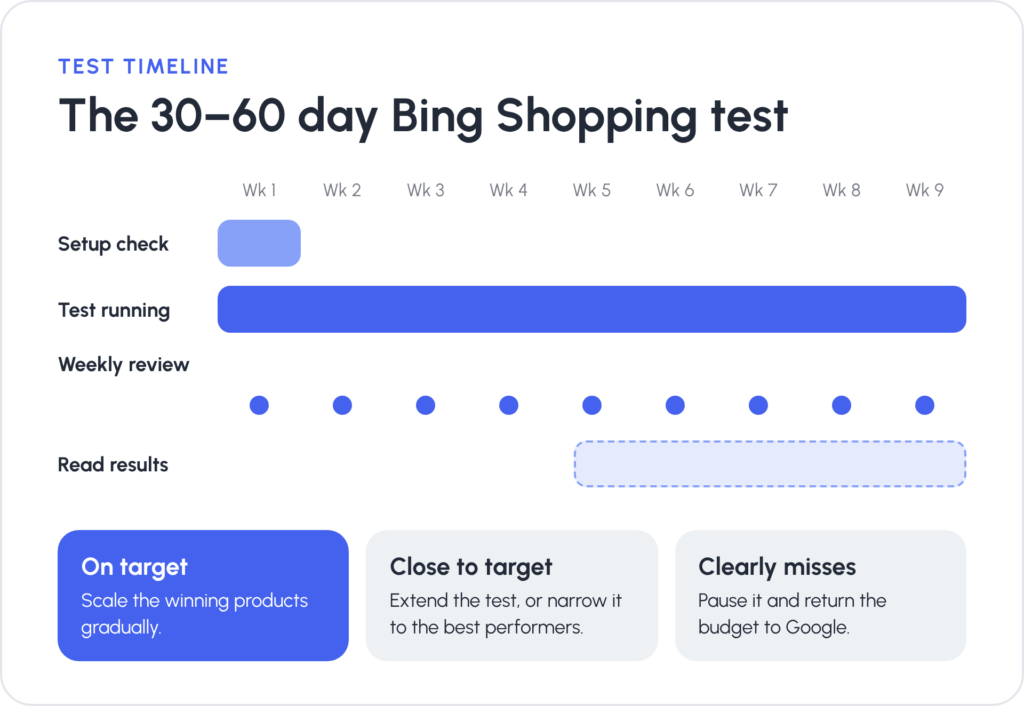
- Keep your Google campaigns at their current budgets and bids so the comparison stays clean.
- Give the campaigns 30 to 60 days, since Bing Shopping’s lower volume takes longer to produce trustworthy trends.
- Check feed approvals in the first week, then leave the structure alone so the results stay readable.
- Review search terms and product performance weekly. If a product gets clicks but no sales, adjust its bid or add negatives instead of rebuilding the campaign.
Make a Decision
- If Bing hits your target, add more products step by step.
- If the result is close, extend the test or narrow it to your top performers.
- If it clearly misses, pause it and move the budget back to Google.
Frequently Asked Questions
For many stores, yes, as a second channel. They tend to pay off for higher-priced or desktop-researched products, provided your Google Shopping account is already profitable and your tracking is reliable. Run a 30- to 60-day test and let ROAS or CPA decide.
Often, yes, because fewer advertisers compete on Bing for the same products. Cheaper clicks don’t always mean higher returns, though, so compare ROAS and CPA, not just CPC. Our breakdown of Google Ads costs gives you a baseline for the Google side.
Yes. The Google import in Microsoft Advertising copies your campaigns and settings, as long as you already have a Microsoft Merchant Center store. Review the feed, bids, and budgets afterwards.
Yes. Bing Shopping ads pull product data from a Microsoft Merchant Center store. You can import it from Google Merchant Center, but still check and fix the data before launch.
Usually not until your tracking is reliable and your Google Shopping account is profitable. A small store can run a limited test on a few products once tracking and the feed are set up.
Yes, under a new name. Bing Merchant Center is now Microsoft Merchant Center, the tool where you create a store, verify your domain, and manage the product feed behind your Bing Shopping ads.
They can. Microsoft shows product ads inside some Copilot answers, and Performance Max campaigns get the widest reach there. You can’t guarantee a Copilot placement, so a complete, accurate feed is the main thing you control.
Final Thoughts
Bing Shopping works best as a second channel. The best candidates have a profitable Google Shopping account, a clean product feed, dependable conversion tracking, and products that appeal to older, desktop-based buyers. Start with your best sellers, run the test for 30 to 60 days, and let ROAS or CPA make the call.
Not sure whether Bing Shopping fits your catalog and budget? Our Bing Ads team can review your feed, tracking, and Google setup and suggest a test plan. You can also see how the channel worked for other brands in our Microsoft Bing Ads case studies.