
You inherited a Google Ads account. Or maybe you’ve been running one for months and the numbers just aren’t moving the way they should. Revenue is flat. ROAS is inconsistent. And every time you ask why, you get a different answer.
Here’s the truth: most underperforming Google Ads accounts don’t have a strategy problem. They have a foundation problem. Broken tracking, bloated keyword lists, misaligned bidding, and a product feed that hasn’t been touched since launch day. As eCommerce brands invest more in paid acquisition, small account issues can have a much bigger impact on profitability.
A proper Google Ads account audit fixes that. This guide shows you what to review, what to prioritize, and where to find the biggest opportunities to improve revenue and ROAS.
What Is a Google Ads Account Audit?
A Google Ads account audit is a comprehensive review of your account’s performance, settings, campaign structure, conversion tracking, bidding strategies, audiences, keywords, and product feed. The goal is to identify wasted ad spend, uncover growth opportunities, and improve return on ad spend (ROAS).
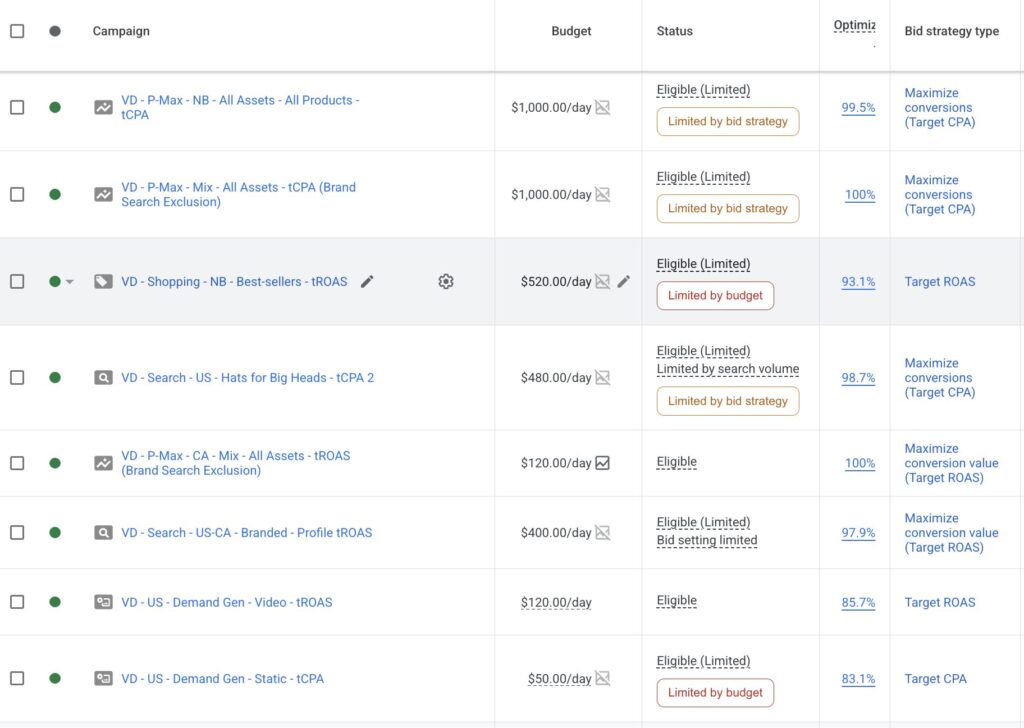
For eCommerce brands, regular audits are important because even small account issues can affect profitability. Inaccurate tracking, inefficient campaign structures, poor budget allocation, or feed errors can lead to missed revenue opportunities and lower advertising efficiency.
What Does a Google Ads Audit Include?
A typical Google Ads audit reviews:
- Conversion tracking and attribution accuracy
- Campaign structure and account organization
- Bidding strategies and budget allocation
- Search terms and keyword targeting
- Audience targeting and remarketing setup
- Performance Max and Shopping campaigns
- Product feed health and Merchant Center settings
- Ad creatives, assets, and extensions
A well-executed audit answers three core questions:
- Is our data trustworthy? Are we measuring the right things, accurately?
- Is our account structure working for us or against us? Are we reaching the right people at the right moment in the funnel?
- Is our spend being allocated efficiently? Are we wasting budget on the wrong keywords, the wrong audiences, or the wrong products?
How to Audit a Google Ads Account for an eCommerce Brand: 10 Key Steps
Follow these ten steps to evaluate account performance, identify wasted spend, and uncover opportunities for profitable growth.
Step 1: Start with Conversion Tracking
Everything in your account depends on conversion data. Smart Bidding uses it to optimize performance. ROAS calculations rely on it. Decisions about which campaigns to scale or pause are based on it. If tracking is inaccurate, every decision that follows becomes less reliable.
The most common tracking issues we find in DTC accounts:
- Double-counted purchase conversions: often caused by a Google Ads tag firing alongside a GA4 import, counting the same transaction twice. This inflates reported ROAS and can mislead Smart Bidding into believing campaigns are generating more value than they actually are, often resulting in inefficient bidding decisions and budget allocation.
- Missing micro-conversions: add-to-cart, checkout initiation, and email sign-up events not being tracked, leaving you blind to funnel drop-off points.
- Incorrect conversion values: revenue not being passed dynamically, or test transactions inflating lifetime numbers.
- Attribution model mismatches: Google Ads, GA4, Shopify, and your backend revenue reports may all assign credit differently. The goal is not to make every platform match perfectly, but to understand which source of truth is used for optimization, reporting, and budget decisions.
What to Audit
Go to Google Ads → Tools & Settings → Conversions and review each conversion action:
- Is the tag implemented correctly?
- Is the conversion value dynamic rather than fixed?
- Is the attribution model configured correctly?
- Is the conversion imported from GA4, tracked directly in Google Ads, or both?
- If both methods are used, are conversions being deduplicated properly?
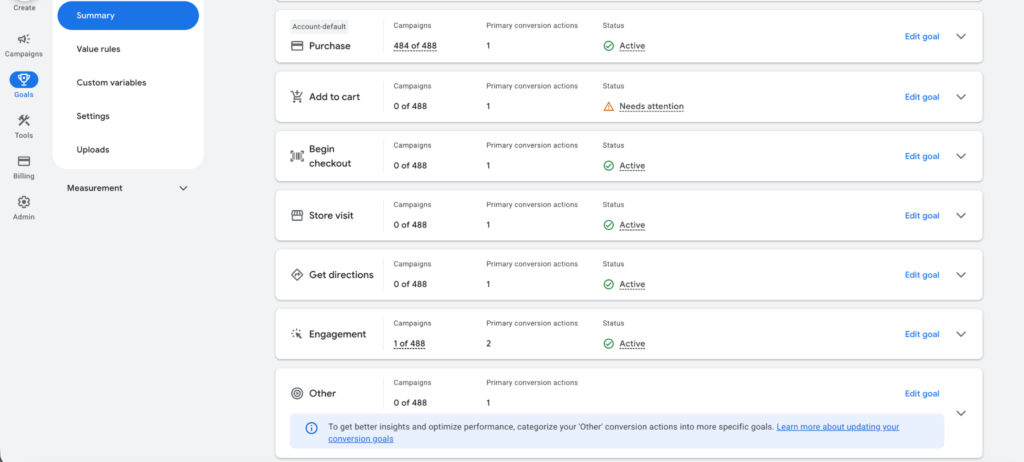
Next, use Google Tag Assistant, GTM Preview Mode, GA4 DebugView, and a controlled test transaction (if possible) to verify a single conversion fires with the correct value.
Also review view-through conversion settings, especially if you are running Performance Max, because they can inflate reported performance.
Fix tracking issues before anything else. Accurate data is the foundation of every successful Google Ads account.
Note: AI can help accelerate parts of the audit process. With native MCP integrations, tools like Claude can analyze Google Ads data and highlight potential issues. However, human review is still important to validate findings, interpret context, and determine the right course of action.
Step 2: Audit Your Campaign Structure Against Your Funnel
Most DTC brands run a mix of campaign types, including Search, Shopping, Performance Max, and sometimes Display or YouTube. The problem is that these campaigns are often set up in isolation, without a clear strategy for how they map to different stages of the customer journey.
A healthy DTC Google Ads account should have a campaign structure that mirrors your acquisition funnel:
- Top of funnel (Awareness): YouTube, Display, and Demand Gen campaigns targeting cold audiences through in-market segments, custom segments, optimized targeting, and first-party audience signals.
- Middle of funnel (Consideration): Broad match Search campaigns, Performance Max with brand exclusions, and Shopping campaigns targeting category-level queries.
- Bottom of funnel (Conversion): Branded Search campaigns, Dynamic Search Ads, remarketing campaigns targeting cart abandoners and product page viewers.
What to Audit
Map each active campaign to a funnel stage. If you can’t do this clearly, your account structure likely needs work.
Common structural issues we find:
- No branded campaign: If you’re not protecting your brand terms, competitors can bid on them and capture some of your highest-converting traffic. A clear understanding of branded vs non-branded keywords is important for accurate performance analysis.
- Brand terms leaking into non-brand campaigns: When branded queries trigger your general Shopping or Search campaigns, they inflate performance metrics and can distort bidding decisions.
- Everything in one Performance Max campaign: PMax is powerful, but running all products and audiences through a single campaign limits visibility and control. Segment campaigns by product category, margin tier, or audience temperature whenever possible.
- No separation between prospecting and remarketing: If remarketing audiences are mixed into prospecting campaigns, CPAs can appear artificially low and mask the true cost of acquiring new customers.
For DTC brands with multiple product lines or large differences in product pricing, we also recommend segmenting campaigns by margin or AOV tier. Your bidding strategy for a $25 product should look very different from your strategy for a $250 product.
Step 3: Dig Into Your Search Terms Report
This is where the budget leaks live. The Search Terms Report shows the searches that triggered your ads and how those searches performed. For many DTC eCommerce brands, it quickly reveals budgets being spent on irrelevant, low-intent, or non-converting queries.
What to Audit
Navigate to Keywords → Search Terms in your Google Ads account. Set the date range to the last 90 days and sort terms by cost.
For each high-spend search term, ask:
- Does this query show commercial intent? For example, someone searching for “what is collagen” is at a very different stage of the buying journey than someone searching for “buy collagen powder.”
- Is this search relevant to our products, or is it only loosely related to what we sell?
- Could this query be covered by a more targeted keyword with a higher Quality Score and lower CPC?
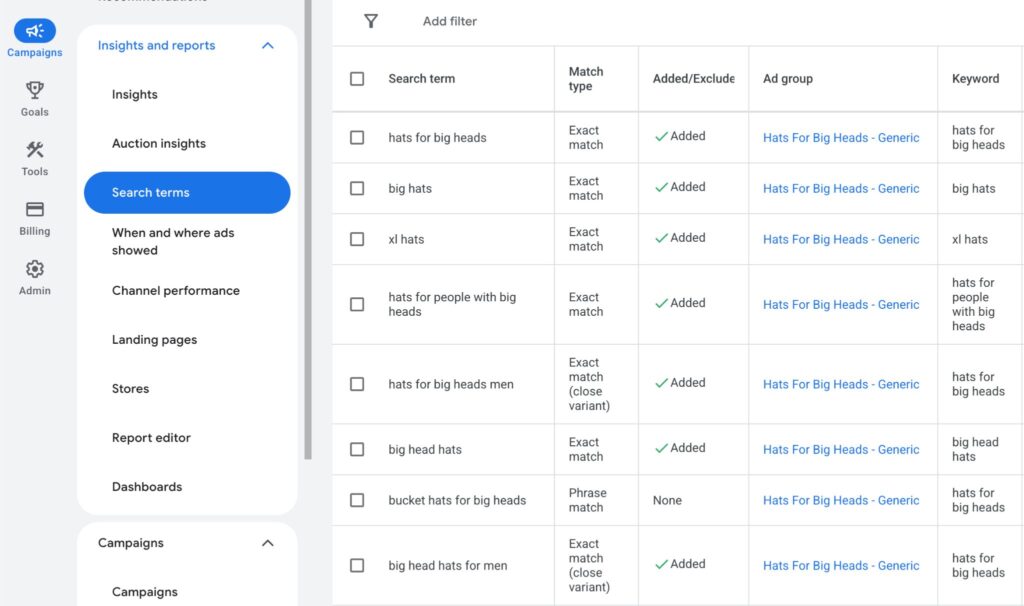
For DTC brands, the most common wasted spend we see comes from:
- Informational queries triggering Shopping or broad match Search campaigns (e.g., “how to use a foam roller” triggering a recovery equipment brand’s Shopping ad)
- Competitor queries showing up in non-branded campaigns with no dedicated competitor campaign to handle them properly
- Broad match keywords with no negative keyword guardrails pulling in completely unrelated search terms
Build a negative keyword list from your findings. Start at the campaign level for specific exclusions, and add shared negative keyword lists at the account level for terms that should never trigger any of your ads (competitor brands you don’t want to associate with, irrelevant categories, non-purchase intent modifiers like “free,” “DIY,” “how to”).
Step 4: Audit Your PMax/Google Shopping and Product Feed
For many DTC eCommerce brands, Shopping campaigns, including Performance Max campaigns that serve Shopping ads, generate a significant share of Google Ads revenue. Yet the product feed is often one of the most overlooked parts of the account.
Your Google Merchant Center (GMC) feed is the foundation of Shopping performance. A poorly optimized feed can limit visibility for high-intent searches, trigger ads for less relevant queries, or reduce click-through rates by presenting products ineffectively.
What to Audit
In Google Merchant Center:
- Check your diagnostics tab for active feed errors. Any disapproved products are not serving, period. Fix these immediately.
- Review product data quality warnings and resolve any issues affecting feed quality.
- Confirm your automatic item updates are enabled. This allows GMC to pull pricing and availability directly from your site, reducing the chance of serving ads for out-of-stock products or incorrect prices.
- Check shipping, returns, tax, GTINs, product identifiers, sale price annotations, and availability accuracy. These feed attributes influence eligibility, trust, and click-through rate before a shopper ever reaches your site.
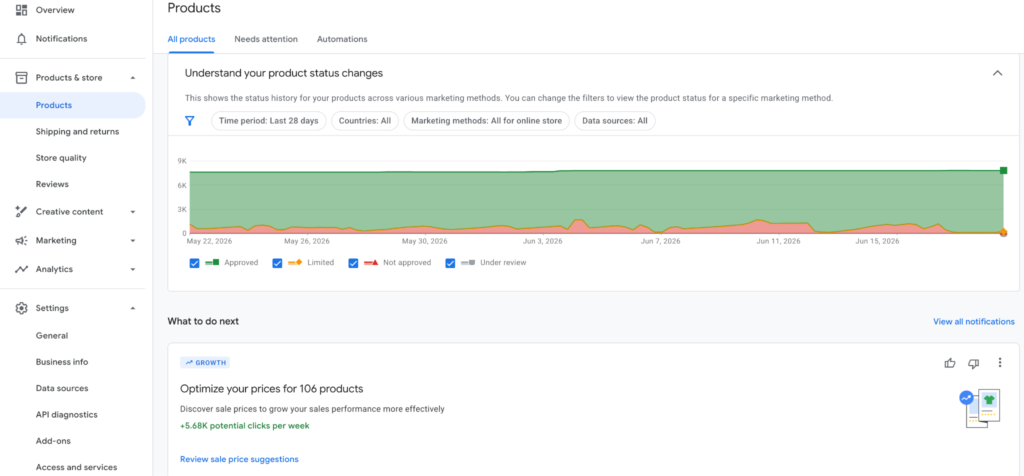
Product titles: Review whether titles are optimized for how shoppers search, not just internal product naming conventions. Include key product types and attributes where relevant.
Product images: Compare your images against top Shopping competitors and ensure they align with category best practices.
Price competitiveness: Use GMC’s Price Competitiveness report to understand how your pricing compares to similar products in the market.
Step 5: Review Your Bidding Strategy for Each Campaign
Smart Bidding has improved dramatically, but it’s not a “set it and forget it” solution, especially for DTC brands where product margins, AOV, and seasonality vary significantly.
What to Audit
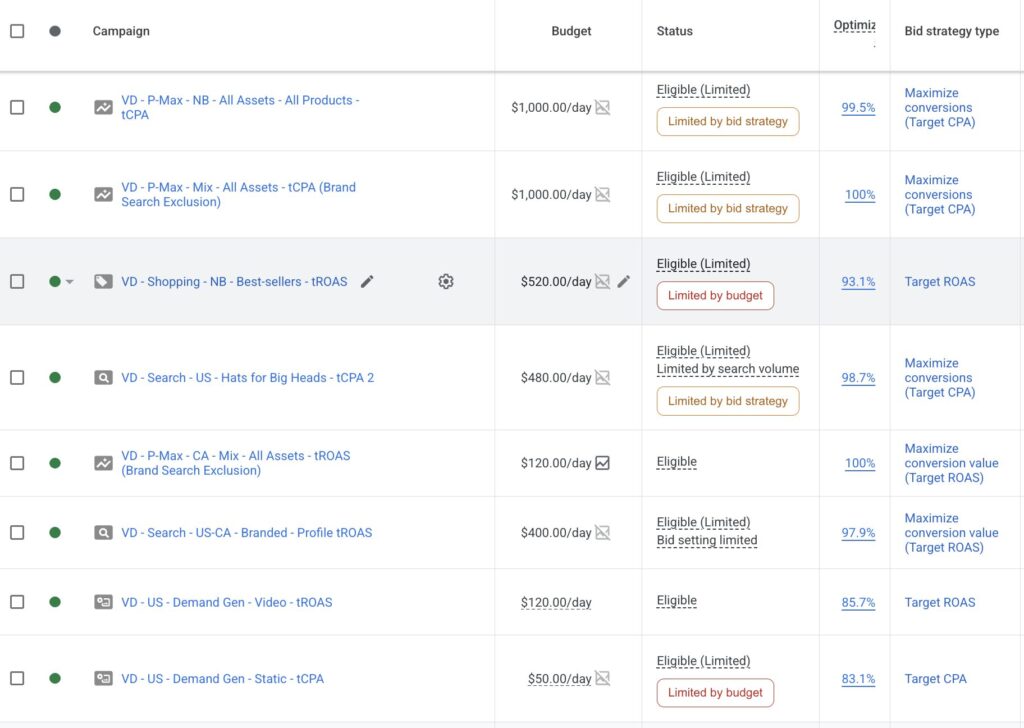
For each campaign, confirm the bidding strategy aligns with its purpose and has enough data to optimize effectively.
| Bidding Strategy | Best For | Data Needed to Run Well | Common Mistake to Avoid |
| Target ROAS (tROAS) | Established campaigns with steady volume and varied order values, where efficiency targets matter. | ~50 conversions per month at the campaign level. | Setting the target well above actual performance (e.g. 800% when you’re achieving 400%), which can significantly limit impressions. |
| Maximize Conversion Value | DTC brands with diverse catalogs and a wide range of order values. | Moderate conversion history; can operate with lower volume than tROAS. | Running without a tROAS target, causing the campaign to prioritize revenue at the expense of efficiency. |
| Target CPA (tCPA) | Subscription or single-SKU brands with relatively consistent conversion values. | Reliable, recurring conversion volume. | Using it for catalogs with large differences in order value, where revenue matters more than acquisition cost. |
| Manual CPC | Branded campaigns or new campaigns in the learning phase that require tighter control. | No minimum data requirement. | Relying on it long term, which limits Google’s ability to optimize bids in real time. |
Common bidding issues:
- Overly aggressive tROAS targets that restrict campaign reach and impression volume.
- Performance Max campaigns running without tROAS or tCPA guardrails.
- Bidding strategies that do not account for seasonal demand fluctuations.
- Campaigns using automated bidding without sufficient conversion data.
Review each campaign’s bidding strategy alongside its 30-day and 90-day conversion volume, ROAS trend, and business objectives. If a campaign consistently misses its targets, the issue is often an unrealistic bid target, insufficient conversion data, or overly restrictive targeting.
Step 6: Audit Your Audience Strategy
Most DTC Google Ads accounts treat audiences as an afterthought. That’s a significant missed opportunity, especially for brands with meaningful CRM data and established customer bases.
What to Audit
Remarketing audiences:
- Are your cart abandoner, product viewer, and past purchaser audiences built and actively used across Search, Shopping, and Display campaigns?
- Are you using Customer Match lists — uploading your email list to target (or exclude) existing customers?
- Are you excluding past purchasers from prospecting campaigns? (If not, you’re paying to acquire customers you already have.)
GA4 audience imports: Confirm your GA4 account is linked to Google Ads and that your GA4-defined audiences, particularly predictive audiences like “likely 7-day purchasers,” are available and being used for bid adjustments or dedicated campaigns.
For DTC brands specifically: Review suppression audiences as carefully as targeting audiences. Exclude existing subscribers or recent purchasers where appropriate, and align remarketing windows with your typical repurchase cycle.
Step 7: Audit Your Ad Copy and Creative Assets
For Search campaigns, ad copy drives clicks and conversions. For Performance Max campaigns, asset quality affects how effectively Google can serve your ads.
What to Audit
Responsive Search Ads (RSAs):
- Does every ad group have at least one active RSA, and is Ad Strength rated Good or Excellent?
- Are headlines and descriptions genuinely differentiated, or are you repeating the same message with minor word variations?
- Do headlines cover multiple value propositions, such as price, quality, trust, shipping, or returns?
- Are keywords naturally included in at least 2–3 headlines without feeling forced?
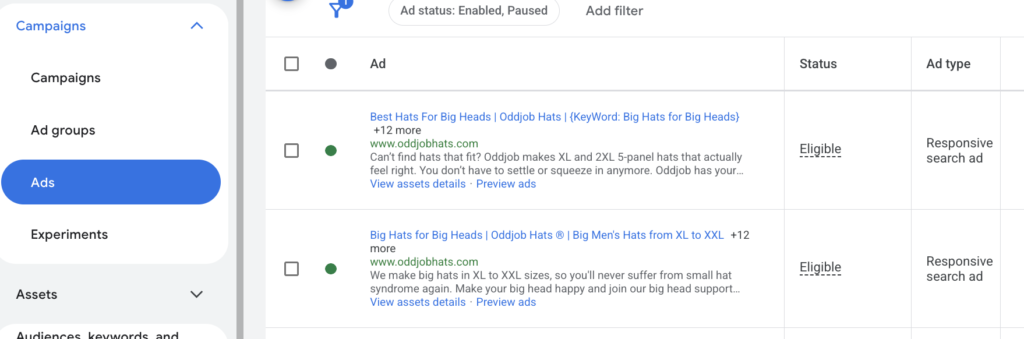
Review whether your ads highlight key differentiators such as shipping, returns, social proof, or promotional offers. Well-written AI ad copy can help surface unique selling points and generate additional headline and description variations for testing.
Performance Max asset groups: Review asset coverage across headlines, descriptions, images, and video. Ensure asset groups contain enough creative variation for Google’s system to test and optimize effectively.
If no video is provided, Google may generate one automatically. In most cases, a brand-created video will provide a better user experience and stronger brand presentation.
Step 8: Evaluate Your Account-Level Settings and Extensions
This is the quickest section to audit and often reveals the easiest wins.
What to Audit
Ad extensions (now called “Assets”): Every campaign should have a complete set of relevant assets. At minimum:
- Sitelinks (4–6, linking to key category pages, bestsellers, and offers)
- Callouts (brand differentiators: “Free Returns,” “Ships in 24 Hours,” “Certified Organic”)
- Structured snippets (product types, features)
- Promotion assets (if you have an active offer)
- Image assets (for Search campaigns — these significantly increase CTR)
- Business name and logo assets

Missing or low-quality assets reduce your ad rank, increase your effective CPC, and make your ads visually smaller in the SERP compared to competitors who’ve done this work.
Location targeting: Confirm your campaigns are targeting your actual service regions. DTC brands that ship only to specific countries frequently find budget leaking to excluded regions because the setting is on “Presence or interest” rather than “Presence” — meaning people who are interested in a location see your ads, even if they’re not located there.
Ad scheduling: Review your performance by hour and day. If your checkout completion rate drops significantly after midnight (common for most DTC categories), are you bidding down during those hours? Are you capturing peak conversion windows (typically evenings on mobile for most DTC categories) with appropriately higher bids?
Step 9: Benchmark Against Competitors
You cannot optimize your account in isolation. Understanding the competitive landscape tells you where you’re overinvesting, where you’re underinvesting, and where there are gaps you can exploit.
Tools to use:
- Google Ads Auction Insights: Available at the campaign and ad group level. Shows you which competitors are bidding on the same terms, their impression share, overlap rate, and position above rate. For your branded campaigns, anyone with a high overlap rate is a threat you should address with higher bids.
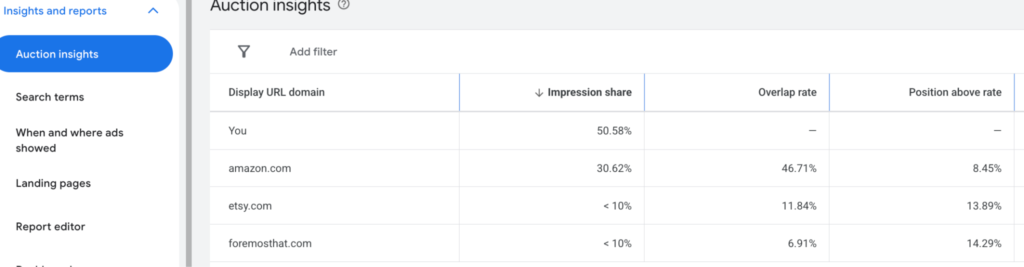
- Google Merchant Center’s Price Competitiveness Report: As mentioned above, shows how your pricing compares for identical or similar products.
- Google Keyword Planner: Use this to identify high-volume keywords your competitors are likely targeting that you’re not currently capturing.
- Paid competitor tools (SEMrush, SpyFu, SimilarWeb): For a deeper view of estimated competitor ad spend, top-performing keywords, and ad copy approaches.
What you’re looking for: Are there high-intent, high-volume keywords relevant to your products where you have low impression share? Are competitors consistently showing above your ads in the auction? Are there product categories you sell where you have zero Shopping coverage?
This competitive audit often surfaces the highest-leverage growth opportunities, including keywords and placements where your competitors are winning not because they’re better, but because they’ve shown up and you haven’t.
Step 10: Evaluate Landing Page, Checkout, and Incrementality
A Google Ads audit should not stop inside Google Ads. For eCommerce brands, campaign performance is directly tied to what happens after the click. If your product pages are slow, unclear, missing trust signals, or creating checkout friction, even a well-structured account will struggle to scale profitably.
What to Audit
Review the landing pages tied to your highest-spend campaigns. For each one, check:
- Is the product or offer immediately clear above the fold?
- Are price, shipping, returns, reviews, and guarantees easy to find?
- Does the page load quickly on mobile?
- Are product images, variants, and availability accurate?
- Is the checkout process simple, especially on mobile?
- Do the landing page claims match the ad copy and Shopping feed?
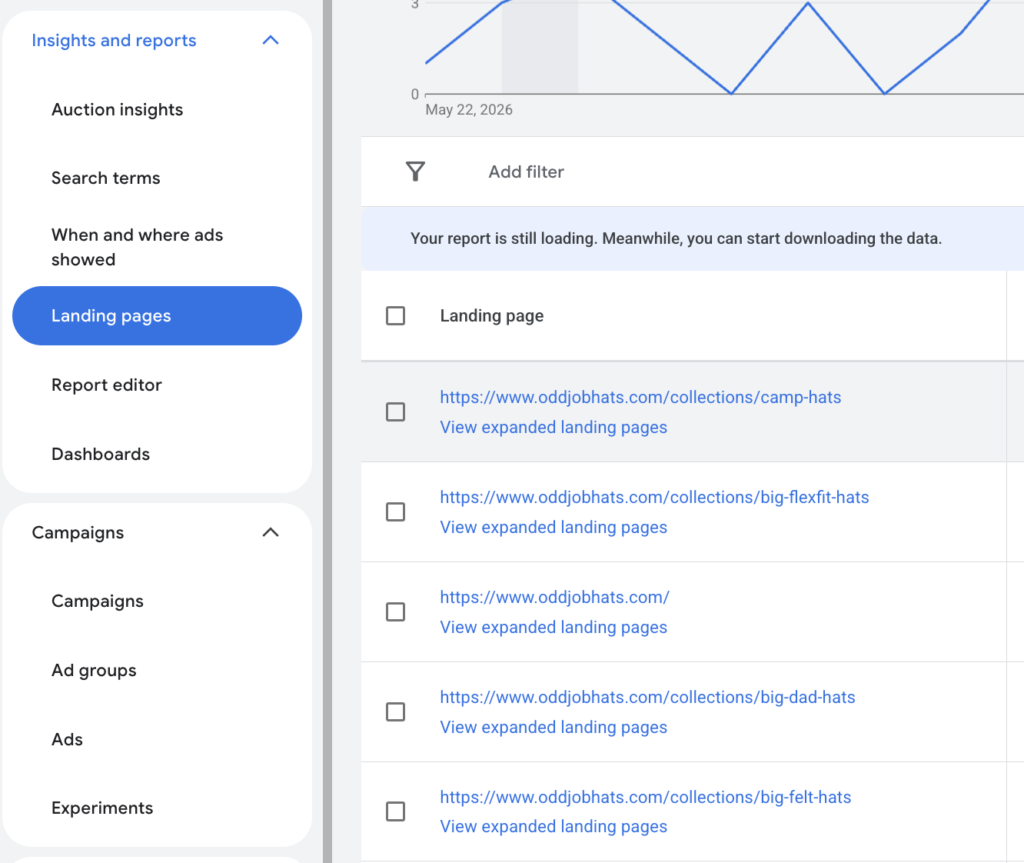
Next, evaluate incrementality. Break out performance by branded traffic, non-brand traffic, remarketing, returning customers, and new customers. A campaign can show strong ROAS while mostly converting people who were already familiar with the brand.
For DTC brands, the goal is not just to find campaigns that convert. The goal is to identify which campaigns are creating profitable new demand, acquiring high-quality customers, and supporting long-term growth.
How Often Should You Audit Your Google Ads Account?
For DTC eCommerce brands, we recommend:
- Full account audit: Every 6 months, or any time you onboard a new agency, hire a new in-house specialist, or experience a sudden significant change in performance.
- Campaign-level review: Monthly, focused on bidding performance, search term quality, and budget allocation.
- Feed and GMC review: Weekly during peak seasons (Q4, major sales events), monthly otherwise.
The worst thing you can do is audit your account once, make improvements, and then let it run untouched. Google Ads is a living system: algorithms update, competition shifts, your product catalog changes, and consumer search behavior evolves. Regular audits ensure your account keeps pace.
Final Thoughts: Start With the Audit, Then Act
A Google Ads audit is not the finish line. It is the starting point for making better decisions across tracking, campaign structure, bidding, feed quality, creative, and customer acquisition.
For DTC eCommerce brands, the accounts that scale most profitably are not always the ones spending the most. They are the ones with cleaner data, stronger controls, better product visibility, and a clearer understanding of where revenue is actually coming from.
If you have worked through this guide and uncovered gaps in your account, VIDEN Growth can help you turn those findings into a focused action plan. Our team can review your Google Ads setup, identify the highest-impact opportunities, and help you prioritize the changes most likely to improve profitable growth.
FAQ
To audit a Google Ads account, review your conversion tracking, campaign structure, bidding strategies, keywords, audiences, ad creatives, and product feed. The goal is to identify wasted spend, improve targeting, and uncover opportunities to increase ROAS and revenue.
A Google Ads account audit is a comprehensive review of an account’s settings, campaigns, tracking, targeting, and performance data. It helps identify inefficiencies, uncover growth opportunities, and improve advertising profitability.
Most eCommerce brands should perform a full Google Ads account audit every six months. Monthly reviews are also recommended to monitor performance, budgets, bidding strategies, and search term quality.
The most common Google Ads mistakes in eCommerce include inaccurate conversion tracking, poor campaign structure, wasted spend on irrelevant search terms, under-optimized product feeds, and unrealistic bidding targets. These issues can reduce efficiency and limit account growth.