Google’s AI Mode passed 1 billion monthly users in May 2026, one year after launch, and AI Overviews now reach more than 2.5 billion users a month. Google also reports that AI Mode queries have more than doubled every quarter since launch.
For advertisers, this growth brings new ad placements with little control. AI Overview ads and AI Mode ads come from your existing Search, Shopping, and Performance Max campaigns, but you can’t target or exclude these placements, and reports don’t show their results separately from the rest of Search.
This guide explains where ads in AI Overviews and AI Mode appear, which campaigns are eligible, whether you need AI Max, how Google matches ads to conversational queries, and what to change in your account to compete for these placements.
How People Search Has Shifted
Search is no longer just keywords and a list of ads. It has become more interactive. According to Google, AI Mode queries are 3x longer than traditional searches, and more than 1 in 6 AI Mode searches are multimodal, which means people search with voice, images, or video, not only text.
Search Engine Land data shows the same shift in paid search: between January 2025 and August 2026, the impression share of one- to two-word queries fell from 42% to 24%.
Discovery is also happening earlier. People now use conversational search to brainstorm ideas and explore options long before they are ready to buy.
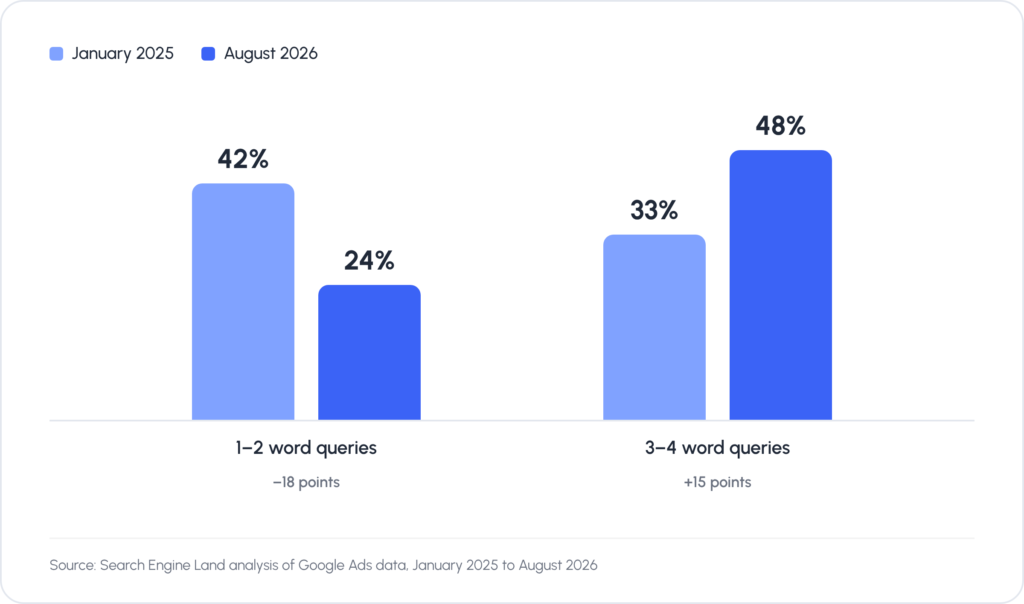
Short queries are losing impression share. Share of Google Ads impressions by query length.
This changes what people expect from search results. A product description alone isn’t enough anymore. People also want to know how a product works in real life, what its limitations are, and why others chose it.
AI systems answer these questions in one conversation, so users can decide faster without visiting multiple websites.
For advertisers, this changes how ads are delivered. When users ask longer, more specific questions, Google matches ads to the intent behind the whole conversation.
Where Google Ads Appear in AI Search
Google Search has two generative AI experiences for different types of questions: AI Overviews and AI Mode. Both run on Gemini, but they work differently. Each is a separate place where your ads can appear, and each builds its answer in its own way.
Ads in AI Overviews
AI Overviews is the AI-generated summary that appears at the very top of Google Search results when a system identifies that generative AI can be useful, for example, when you need to gather information from different sources.
AI Overview ads are text and Shopping ads that Google shows above, below, or inside an AI Overview when a search has commercial relevance. They are labeled “Sponsored” and come from your existing Search, Shopping, and Performance Max campaigns.
Google confirms that ads inside an AI Overview must address both the query and the information in the AI-generated answer. The same ad can show above an AI Overview and inside it on one search, but never inside it and directly below it.
Three types of ads currently appear in AI Overviews:
- Standard text search ads: above or below the AI Overview, and inside it when they match the AI answer.
- Shopping ads and product listing units: embedded within the AI-generated answer itself.
- Other formats: Google is also experimenting with other types of ads such as local inventory ads and vehicle ads.
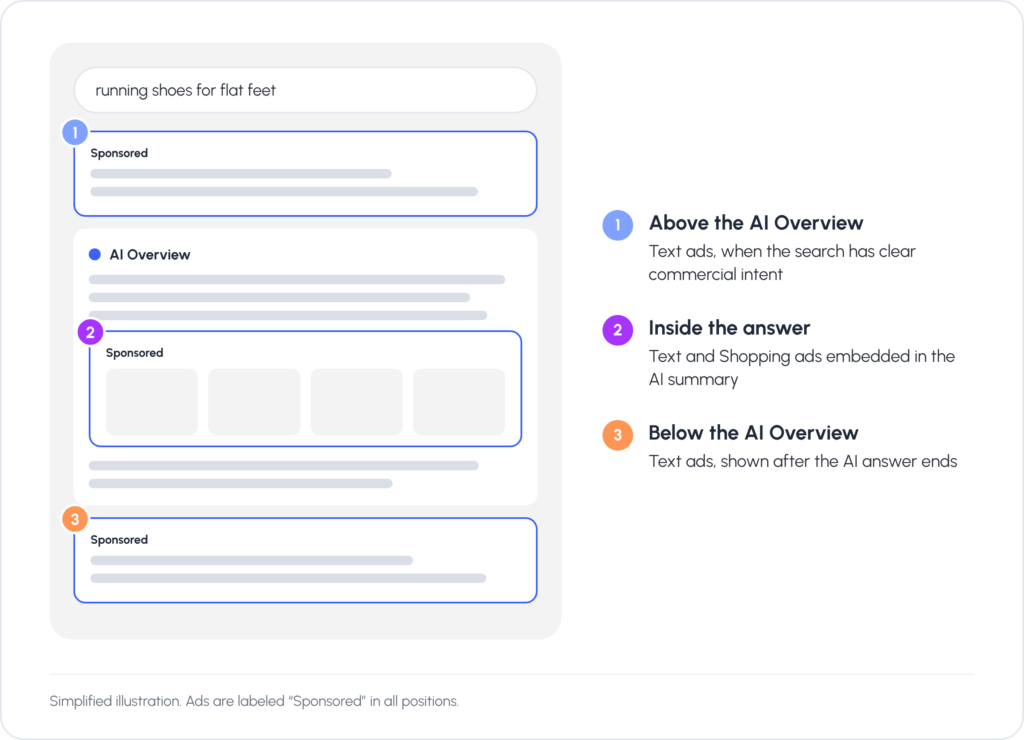
Where ads can appear in an AI Overview. Placement depends on the query and on what the AI answer covers.
Ads can appear in different positions within an AI Overview, depending on the query:
- Before the answer, as a lead-in recommendation
- In the middle of the summary, as a relevant aside
- After the answer, as a closing suggestion
Google keeps testing these layouts, so positions may change, and reports don’t show which position your ad held.
Ads in AI Mode
AI Mode is a conversational search experience in its own tab in Google Search. Users can ask follow-up questions, refine their search, and explore a topic in depth without returning to traditional search results.
AI Mode ads are sponsored results inside AI Mode answers. Like ads in AI Overviews, Google Ads in AI Mode appear only when a search or conversation has clear commercial relevance. In the US, they can also appear on answers to follow-up questions.
AI Mode ad formats are still changing. Five types of AI Mode ads can currently appear:
- Existing Text Ads: Standard text ads that appear inside the AI Mode response or at the end of it. Their headlines relate to the search query, so they fit into the conversation.
- Existing Shopping ads: Built for eCommerce stores, these ads appear as single cards or in a carousel, showing the product image, title, price, site name, and rating.
- Direct Offers: Promotions that appear during shopping conversations when someone asks about discounts or deals. Since October 2026, Google has been testing a Direct Offer asset in beta for campaigns that use AI Max or text customization.
- Conversational Discovery ads: Gemini writes the ad creative to answer the user’s specific question, so the ad reads as part of the answer instead of static ad copy.
- Highlighted Answers: Sponsored businesses appear inside AI-generated recommendation lists. When AI Mode recommends products or services, a relevant sponsored result can be highlighted in the list next to organic suggestions.
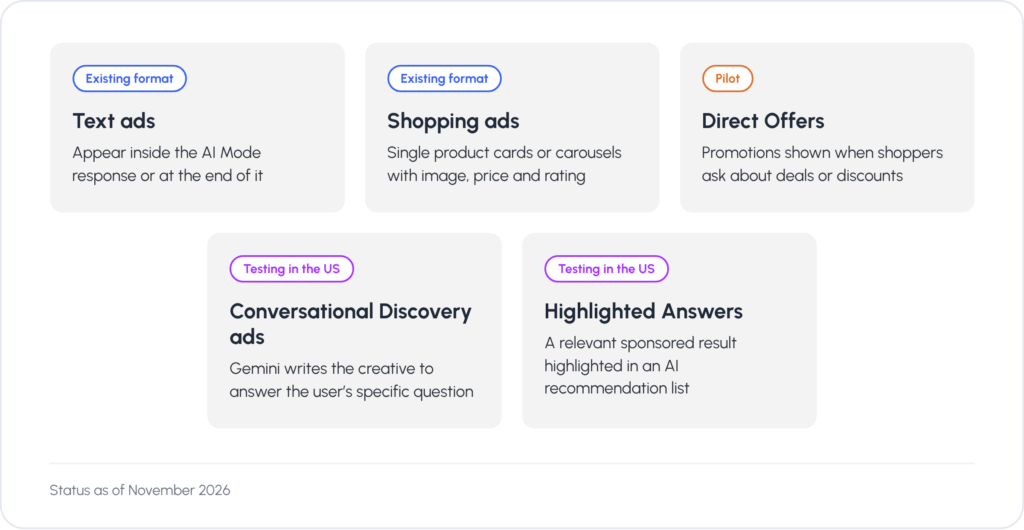
Ad formats that can appear in AI Mode. Two existing formats and three new ones that are still in a pilot or a test.
AI Mode vs. AI Overviews at a Glance
| Aspect | AI Mode | AI Overviews |
| Location | Separate tab in Google Search | Top of search results page |
| User Intent | Deep exploration, multi-turn conversation | Quick answers, information gathering |
| Query Type | Exploratory, follow-up questions | Informational, comparison queries |
| Ad Placement | Within conversation or at end | Above, below, or within AI summary |
| Ad Formats | 5 types (Text, Shopping, Direct Offers, Discovery, Highlighted) | Text and Shopping ads |
| Best For | Research, detailed exploration, product comparison | Quick product lookups, decision support |
As of November 2026, Conversational Discovery ads and Highlighted Answers are still being tested in the US, and Direct Offers is a pilot, so most accounts can’t show these formats yet. Knowing how they work now will help you prepare before they reach your account.
Ads in AI Overviews and AI Mode can also show with an AI explainer: a short text Gemini writes to explain how an ad relates to the search, based on the query, the AI response, and public sources such as your website. You can’t write, edit, or turn off these explainers, so keep your site content accurate and up to date.
Ad Eligibility in AI Overviews and AI Mode
Your campaign type, AI Max settings, and match types decide whether your ads can show in AI Overviews and AI Mode, and for which queries.
Which Campaigns Can Show Ads in AI Overviews and AI Mode?
You do not need to create a separate ad campaign type to appear in Google’s AI experiences. Your existing campaigns are automatically eligible if they match the user’s query and the content of the AI answer:
- Search campaigns (contextual matching needs broad match or AI Max)
- Standard Shopping campaigns
- Performance Max campaigns
Google doesn’t offer a setting to exclude your ads from AI Overviews or AI Mode while keeping them active on traditional search, and you can’t target these placements directly. Your existing controls still apply, including negative keywords, brand exclusions, and asset pinning.
Where Ads in AI Overviews and AI Mode Are Available
As of November 2026, availability depends on where the ad appears:
- Above or below an AI Overview: all 200+ countries and languages where AI Overviews are available.
- Inside AI Overviews and AI Mode: English only, in the US, Australia, Canada, India, Kenya, Malaysia, New Zealand, Nigeria, Pakistan (text ads only), the Philippines, Singapore, and Indonesia (AI Overviews only).
Google plans to add Brazil, Mexico, and the UK in Q4 2026. In other markets, including EU countries, ads can currently appear only above or below AI Overviews.
Do You Need AI Max for Search to Show Ads in AI Mode and AI Overviews?
AI Max is not required to show ads in Google’s AI Overviews or AI Mode. According to Google’s official documentation, existing Search, Shopping, and Performance Max campaigns are automatically eligible to serve ads within these AI-powered experiences.
What AI Max does is expand your Search campaign’s reach in AI-powered placements. AI Max for Search is a setting you turn on inside an existing Search campaign. It applies broad match logic to all your keywords and adds keywordless matching, similar to Dynamic Search Ads. It has three parts:
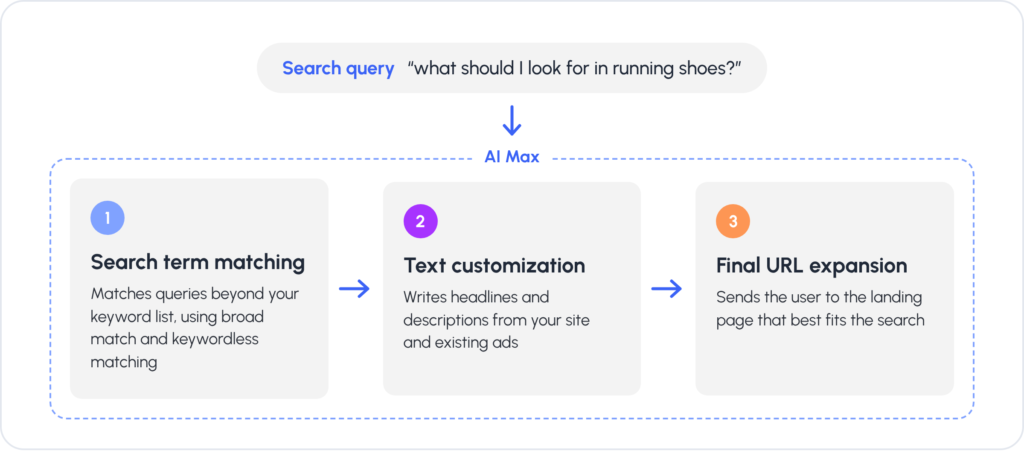
How AI Max expands a Search campaign. Three features you turn on inside an existing Search campaign.
- Search term matching expands beyond your keyword list using broad match and keywordless matching, so you can reach long-tail searches you didn’t explicitly bid on.
- Text customization allows Google to dynamically write headlines and descriptions pulled from your site and existing ads, tailoring them to each search context.
- Final URL expansion sends users to the landing page Google determines is the best match for their search, rather than the one you manually assigned to each keyword.
How Ad Matching Works in AI Overviews and AI Mode
Google matches ads in AI Overviews and AI Mode in two ways. For searches with clear commercial intent, it matches ads directly to the query. For exploratory or conversational questions, it matches ads to both the query and the AI-generated response. For example:
- Direct search: when someone types “running shoes for men” into the search bar, Google matches ads directly to that specific query, the same way it would on a traditional Google Search results page.
- Exploratory question: when someone asks “what should I look for in running shoes?”, they may not be ready to buy yet. The AI response covers cushioning, foot support, and brand comparisons, and Google shows relevant sponsored text or Shopping ads based on what the AI recommended.
Match Types and Contextual Matching
Which type of matching your ads can use depends on the campaign setup:
| Campaign Setup | Direct Matching | Contextual Matching |
| AI Max for Search | Yes | Yes |
| Search with Broad Match | Yes | Yes |
| Standard Shopping | Yes | Yes |
| Performance Max | Yes | Yes |
| Search with Exact or Phrase Match | Yes | No |
Exact and phrase match keywords are tied to specific search terms, so they can’t match the AI’s reading of an exploratory question. This is why Google recommends broad match and AI-powered campaigns for AI Overviews and AI Mode.
What This Means for Advertisers
You can’t control whether your ads appear in AI surfaces, but you can set up your campaigns to compete for them.
Review Your Match Types
Audit keyword match types across all Search campaigns. Google says broad match and keywordless targeting paired with Smart Bidding work best for AI Overviews and AI Mode.
Exact and phrase match still work for direct commercial searches, but they miss contextual matches on exploratory questions. Check which exact or phrase match keywords you can safely broaden.
With broad match or AI Max turned on, monitor your search terms closely. Add negative keywords for low-intent informational queries that collect impressions without conversions.
Protect Branded Search
People who search for your brand by name are usually close to buying. Keep your brand campaign running even as AI Overviews change how search works. Without active brand ads, competitors can take that traffic and appear next to the AI Overview for your brand.
Landing Pages Deserve More Attention
Landing pages shape the signals Google receives after the click, and those signals influence how campaigns optimize over time. With AI Max, your pages also feed Google’s matching and ad creation:
- Text customization can generate ad assets from your domain, landing pages, existing ads, and keywords.
- Final URL expansion can send users to a different page on your site if Google decides it fits the search better.
Build Assets for Conversational Search
Google matches ads to both what users search for and what the AI recommends, so your assets need to answer questions as well as sell.
Start with variety. In AI Max or Performance Max, add multiple headlines and descriptions, plus informational images and videos that cover different parts of your offer. Upload images and videos in every required format so Google can use your assets across different response types.
Write headlines that read as answers or short summaries. Clear, informative copy is easier for Google to match to a specific question.
Pair that copy with a detailed landing page. The more relevant content Google can draw from, the more queries your ad can match.
AI Max and asset customization generate headlines, choose landing pages, and expand your keyword reach automatically. Check your campaigns regularly to stay in control:
- Review the search terms report to catch irrelevant matches before they waste budget.
- Check the landing pages that final URL expansion sends users to, and make sure they match your offer.
- Audit automatically created assets to confirm they match your brand voice.
Use Smart Bidding with Clean Conversion Data
Smart Bidding strategies like Maximize Conversions or Target ROAS work better with clean conversion data and enhanced conversions. Accurate signals help the algorithm separate casual, exploratory clicks from high-intent clicks by buyers.
This matters more in AI search, where broader queries mix curiosity with commercial intent. With good data, the algorithm learns what to bid on and what to skip, and puts your budget toward the traffic most likely to convert. Google also recommends keeping budgets flexible on high-performing campaigns, so bidding can respond to exploratory searches.
Rich Product Feeds Win in AI Search
In AI-powered shopping and search, your product feed now matters more. Google’s systems rely on structured feed data, Merchant Center information, and schema markup to identify, compare, and recommend products.
Polish the basics:
- Clear, descriptive product titles
- High-resolution images from multiple angles
- Accurate, keyword-rich product types
- Competitive, up-to-date pricing
- Clear shipping and return policies
AI-specific enrichment:
- Consider product highlights. Tell Google the 2-6 most important customer-facing benefits of your product.
- Add relevant product attributes: Size, Material, Gender, etc.
- Consider conversational attributes. Google added new feed attributes specifically for AI shopping: question and answer, document link, related product, item group title, variant option, and popularity rank. These help AI systems understand your products the way customers talk about them.
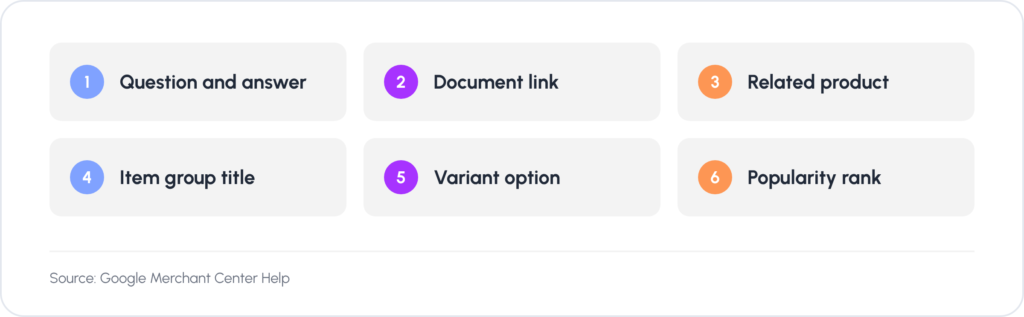
Conversational attributes in Merchant Center. Six feed attributes that help AI shopping surfaces describe products the way customers ask about them.
Reporting Is the Hardest Part
Measuring performance in AI Overviews and AI Mode is harder than it looks. Google includes their impressions, clicks, conversions, and cost in your standard campaign reports, and their queries in the search terms report.
These results are only included in aggregate. No segment separates them from the rest of Search, so you can’t attribute performance to these placements directly.
The most detailed view you have is AI Max reporting. It shows how expanded and keywordless matches, AI-generated headlines, and selected landing pages perform. That tells you how a campaign operates, but it isn’t a report on performance inside AI Mode or AI Overviews.
Make sure your campaigns qualify for these placements, then focus your optimization on the metrics you have data for.
Final Thoughts
AI Overviews and AI Mode add new places for ads to appear, and traditional search keeps working alongside them. Text and Shopping ads still serve direct commercial searches, so your day-to-day account management stays largely the same.
The bigger change is where impressions come from and when ads appear. Customers now work out what they need in a conversation, before they settle on a product, so your ads may reach them earlier. That makes clear, specific messaging more important than before.
The fundamentals still decide results: accurate data, strong messaging, and clear measurement. Get those right first, then adapt them to the new placements.
If you need help adapting your account, our Google Ads management team can review your match types, bidding, and product feeds, then prepare your campaigns for AI Overviews and AI Mode.
Frequently Asked Questions
Yes. Text and Shopping ads from your existing Search, Shopping, and Performance Max campaigns can appear in AI Overviews and AI Mode when a query has commercial intent, so you don’t need a new campaign type. Google is also testing formats built for AI Mode, such as Direct Offers, Conversational Discovery ads, and Highlighted Answers.
AI Max for Search is a setting you turn on inside a Search campaign. It applies broad match logic to your keywords, adds keywordless matching, and can customize ad text and choose the landing page that best fits each search. AI Max isn’t required for ads in AI Overviews or AI Mode, but it expands the range of searches your campaign can match.
No. Google has no setting that excludes these placements while keeping your ads on traditional search, and you can’t target them directly either. Negative keywords and brand exclusions still control when your ads serve.
Google hasn’t published click-through data for ads in or around AI Overviews, and its reports combine these placements with the rest of Search. Track CTR and conversions by query type in your account, and judge results by conversions, not clicks alone.
Their results are included in aggregate in your campaign and search terms reports, but Google doesn’t break them out separately. Use AI Max reporting to see how expanded matches, generated headlines, and selected landing pages perform.
Google Ads pricing works the same way as for standard Search ads: the same auction and the same CPC or conversion-based bidding. Google doesn’t charge extra for these placements, and you pay only for valid clicks.
No. Organic AI Overviews and AI Mode answers are generated independently, so buying ads doesn’t change them. Being cited in an organic answer also doesn’t affect your ad eligibility.