
More than 2 million businesses advertise on Meta every month in the U.S. alone, and Meta reports that its AI-driven advertising tools can improve advertisers’ return on ad spend by 22% on average.
But AI can only optimize what’s already in your account. If your campaigns suffer from issues like poor account structure, audience overlap, creative fatigue, or tracking errors, even the best optimization algorithms won’t deliver their full potential.
That’s why regular account audits are important. In this guide, you’ll learn how to use AI to audit your Meta Ads account step by step, uncover hidden performance issues, and prioritize the optimizations that will have the biggest impact on your results.
What Is a Meta Ads Audit and Why Is It Important?
A Meta Ads audit is a systematic review of your advertising account to identify what’s working, what’s underperforming, and where you can improve campaign efficiency. It involves analyzing key elements such as campaign structure, audience targeting, budget allocation, creatives, tracking setup, and overall performance.
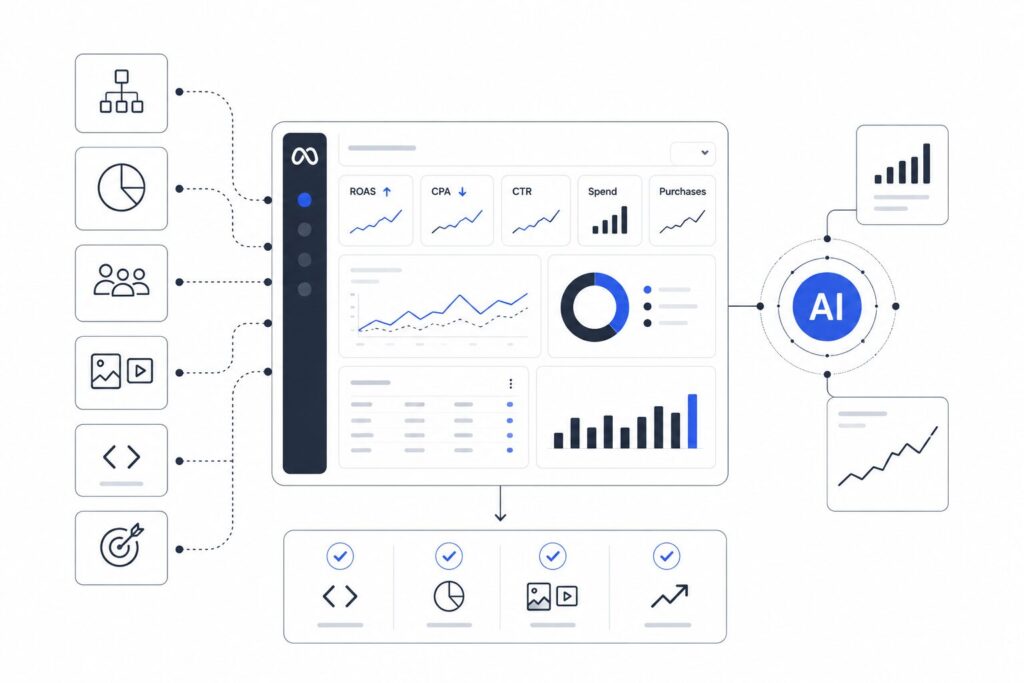
Regular audits help keep your account efficient as campaigns evolve. Without them, issues like audience overlap, creative fatigue, tracking errors, or inefficient budget allocation can reduce ROAS and limit growth.
A well-executed audit helps you:
- Detect performance bottlenecks before they become costly.
- Identify opportunities to reallocate budget toward higher-performing campaigns.
- Ensure your Pixel and Conversion API are tracking events correctly.
- Improve campaign scalability with a cleaner account structure.
- Make better optimization decisions based on data instead of assumptions.
A complete Facebook Ads audit covers multiple aspects of your account, and not every task benefits from AI in the same way. Before we walk through the audit process, let’s explore where AI delivers the most value and where marketers should rely on their own expertise.
Need a professional Meta Ads audit? If you’d rather skip the manual review, VIDEN Growth’s Meta Ads Audit service provides a detailed analysis of your account along with clear, prioritized recommendations to improve performance.
What Can AI Help You Audit in a Meta Ads Account?
AI can review thousands of data points across your Meta Ads account in minutes. Instead of spending hours digging through reports, you can quickly identify performance issues, uncover optimization opportunities, and focus on the changes that are most likely to improve results.
| Audit Area | What AI Can Do | What Still Requires Human Input |
| Campaign Structure | Detect duplicate campaigns, inconsistent naming, or inefficient account organization | Decide whether the structure supports your business goals and growth strategy |
| Budget Allocation | Identify campaigns with high CPA, low ROAS, or uneven budget distribution | Set budget priorities based on profitability, inventory, and growth targets |
| Audience Analysis | Find audience overlap, high frequency, and declining performance | Choose the right targeting strategy and define ideal customer segments |
| Creative Performance | Highlight top- and low-performing ads, detect creative fatigue, compare formats, and analyse your creative mix to identify gaps, content distribution, and opportunities for improvement | Evaluate brand messaging, creative quality, market relevance, and decide which creative direction to pursue |
| Cross-Platform Performance Analysis | Connect Meta Ads data with Shopify, GA4, CRM platforms, and other third-party tools to analyse the true business impact of campaigns, creatives, landing pages, and customer journeys | Verify insights, interpret business context, and decide which optimisations align with your commercial goals |
| Tracking & Attribution | Flag missing events, unusual conversion trends, or tracking inconsistencies | Configure tracking, troubleshoot technical issues, and verify data accuracy |
| Optimisation Opportunities | Identify inefficient campaigns, ads, audiences, and budget allocation, then prioritise optimisation opportunities based on their potential impact | Decide which recommendations to implement, validate the findings, and determine the right timing for changes |
How to Audit a Meta Ads Account Using AI
An AI-powered Meta Ads audit follows the same principles as a traditional account review but completes the analysis much faster. AI reviews your campaign data, identifies performance issues, and highlights the optimizations most likely to improve results.
Follow the steps below to audit your Meta Ads account and build a clear action plan based on AI-driven insights.
Step 1. Connect Your Marketing Data
Before asking AI to audit your Meta Ads account, connect it to the platforms that contain your marketing and business data. Rather than relying on exported reports, AI can analyse live data from multiple sources, giving it a more complete view of your marketing performance.
Connect AI to:
| Platform | Purpose |
| Meta Ads | Campaign performance, account structure, audiences, budgets, placements, and creative metrics |
| Shopify (or your eCommerce platform) | Revenue, orders, products, average order value (AOV), and customer behaviour |
| Google Analytics 4 (GA4) | Landing page performance, website engagement, and user journeys |
| CRM or Customer Database | Customer quality, lifetime value (LTV), and repeat purchase data |
| Reporting Platforms | Consolidated marketing and business KPIs |
| Creative Intelligence Tools (e.g. Motion, Foreplay) | Creative performance, creative mix analysis, and competitor creative insights |
| Business Documents | Marketing strategy, KPIs, campaign briefs, and testing frameworks |
| Gmail or Slack | Campaign discussions, testing notes, and recent account changes that provide additional context |
If direct integrations aren’t available, you can upload reports from these platforms instead.
Once connected, AI can analyse campaign performance across multiple timeframes (such as the last 7 days, last 30 days, month-over-month, quarter-over-quarter, and year-over-year) while considering website behaviour, customer journeys, creative performance, and business outcomes, not just Meta Ads metrics in isolation.
Include the following metrics in your analysis:
| Category | Metrics |
| Performance | Impressions, Reach, Clicks, CTR, CPC, CPM, Cost per Landing Page View |
| Conversions | Landing Page Views, Add to Cart (ATC), Initiate Checkout (IC), Purchases, Cost per Add to Cart, Cost per Initiate Checkout, Cost per Purchase (CPA), Purchase Value, ROAS |
| Spend | Amount Spent, Budget |
| Engagement | Frequency |
| Video Performance | Thumbstop Ratio, Hook Rate, Hold Rate, Average Play Time, Video Views |
| Campaign Details | Campaign Name, Objective, Status, Ad Set Name, Audience, Placements |
Whenever possible, provide campaign-, ad set-, and ad-level data. Combining advertising, website, and eCommerce data gives AI enough context to determine whether issues stem from campaign structure, audience targeting, budget allocation, creative performance, landing page experience, or the conversion funnel.
You should also provide AI with business context, such as:
- your target CPA or ROAS;
- average order value (AOV);
- primary campaign objective (e.g. maximize purchases or increase ROAS);
- any recent changes to the account, such as new creatives or budget increases.
AI Prompt
“I’m auditing a Meta Ads account for an eCommerce brand. Analyze the connected marketing data sources and identify the biggest performance issues, unusual trends, and optimization opportunities. Compare recent performance with historical trends, highlight inefficiencies, and rank your recommendations by potential business impact. Explain the reasoning behind each recommendation.”
Step 2. Review Your Campaign Structure
A well-organized campaign structure makes your Meta Ads account easier to manage, optimize, and scale. If your account contains duplicate campaigns, inconsistent objectives, or unclear naming conventions, it’s harder to analyze performance and allocate budget effectively.
Review the following areas:
- Campaign objectives and whether they align with your business goals.
- Campaign and ad set naming conventions.
- Duplicate or overlapping campaigns.
- Budget distribution across campaigns and ad sets.
- Whether campaigns follow current Meta Ads best practices, such as using Advantage+ features where appropriate and avoiding unnecessary audience exclusions.
- Whether key campaign types and optimization strategies are being used, including Dynamic Product Ads (DPAs), Value Optimization, Cost Caps, and other bidding or optimization settings.
AI can compare campaigns across your account, detect structural issues, evaluate whether your setup follows Meta Ads best practices, and identify missed opportunities to improve performance through features such as Advantage+, Dynamic Product Ads (DPAs), Value Optimization, and Cost Caps.
AI Prompt
“Analyze the campaign structure in this Meta Ads account. Identify duplicate campaigns, inconsistent naming conventions, overlapping objectives, and opportunities to simplify the account structure. Evaluate whether the account follows Meta Ads best practices, identify missing or underutilized campaign features (such as Advantage+, Dynamic Product Ads, Value Optimization, or Cost Caps), and recommend improvements. Explain how each issue may affect performance and rank your recommendations by potential impact.”
Red Flags
- Multiple campaigns target the same audience with the same objective.
- Campaign names don’t follow a consistent format.
- Too many active campaigns compete for the same budget.
- Similar products run in separate campaigns without a clear reason.
- Campaign objectives don’t match the intended business outcome.
- Dynamic Product Ads or other recommended campaign types are missing or receive insufficient budget.
- Meta Ads best practices and optimization features (such as Advantage+ or Value Optimization) are not being used where appropriate.
Step 3. Analyze Budget Allocation
Even a well-structured Meta Ads account can underperform if the budget is distributed inefficiently. Some campaigns receive more spend than they can justify, while others deliver strong results but don’t have enough budget to scale.
Review how your budget is allocated across campaigns and ad sets. Compare spend against key performance metrics such as ROAS, CPA, and CAC, as well as purchase value and conversion volume. This helps you identify where your budget generates the highest return and where it goes to waste.
Pay attention to:
- Campaigns with high spend but low ROAS.
- Campaigns with a high CPA compared to your target.
- High-performing campaigns that receive only a small share of the budget.
- Large differences in performance between ad sets within the same campaign.
- Budget wasted on underperforming placements, audience segments, or age groups.
- Whether new ads receive enough spend to generate statistically meaningful results.
- Whether high-performing ads receive sufficient budget within the current campaign structure.
AI can compare budget allocation with performance across campaigns, ads, audiences, and placements to identify wasted spend, scaling opportunities, and budget reallocation recommendations.
AI Prompt
“Analyze budget allocation across this Meta Ads account. Compare spend with ROAS, CPA, purchase value, and conversion volume. Identify campaigns, ads, placements, audiences, or demographic segments that receive too much or too little budget. Evaluate whether new creatives receive enough spend for testing and whether top-performing ads have sufficient budget to scale. Explain your reasoning and rank the recommended budget changes by expected business impact.”
Red Flags
- High spend with consistently low ROAS.
- CPA exceeds your target for an extended period.
- Top-performing campaigns receive a small percentage of the total budget.
- One or two campaigns consume most of the budget without delivering the best results.
- Large performance gaps between ad sets within the same campaign.
- Significant budget is spent on consistently underperforming placements or demographic segments.
- Winning ads are limited by budget, while weaker creatives continue to receive spend.
- New creatives do not receive enough budget to produce reliable performance data.
Step 4. Audit Audience Performance
Audience targeting has a direct impact on campaign efficiency. Even strong creatives and competitive offers can underperform if your audiences overlap, become saturated, or fail to reach the right customers.
Review audience performance across campaigns and ad sets to understand which segments generate the best results and which limit scalability.
Focus on:
- ROAS and CPA by audience.
- Audience overlap between campaigns.
- Frequency and signs of audience fatigue.
- Performance differences between prospecting, retargeting, and existing customer audiences.
- Audience size and delivery stability.
AI can compare audience segments across your account, detect overlap, identify declining performance caused by ad fatigue, and highlight the audiences that contribute most to profitable growth.
AI Prompt
“Analyze audience performance in this Meta Ads account. Compare audiences based on ROAS, CPA, frequency, conversion volume, and spend. Identify audience overlap, signs of audience fatigue, and opportunities to consolidate or expand targeting. Rank your recommendations by expected business impact.”
Red Flags
- High frequency combined with declining CTR or ROAS.
- Multiple campaigns targeting nearly identical audiences.
- Prospecting audiences significantly underperform compared to benchmarks.
- Retargeting campaigns receive excessive budget despite limited audience size.
- Small audiences show unstable delivery or rising CPM.
Step 5. Evaluate Creative Performance
Creative is one of the biggest drivers of Meta Ads performance. Even with strong targeting, outdated or ineffective ads can reduce click-through rates, increase acquisition costs, and limit campaign scalability.
Review creative performance at the ad level rather than relying only on campaign averages. Evaluate not only which creatives perform best, but also whether your account maintains a healthy creative testing process and enough creative diversity to support sustainable growth.
Pay attention to:
- Creative performance across CTR, CPC, CPA, ROAS, and conversion rate.
- Video engagement metrics, including Thumbstop Ratio, Hook Rate, Hold Rate, and Average Play Time.
- Whether your creative mix covers different formats, messaging angles, customer personas, and offers.
- Whether Partnership Ads and other relevant creative formats are part of the mix.
- Whether new creatives are launched regularly (ideally weekly) and receive enough spend for reliable testing.
- Whether the account has enough creative volume and regularly refreshes its core creative pillars.
- Whether the account relies too heavily on one or two winning creatives.
- Ad comments and overall sentiment that may influence performance.
- Signs of creative fatigue.
AI can evaluate creative performance at scale, identify winning patterns, assess the health of your creative strategy, and recommend where to improve testing, diversify the creative mix, and refresh existing concepts.
AI Prompt
“Analyze creative performance across this Meta Ads account. Compare creatives based on CTR, CPC, CPA, ROAS, conversion rate, spend, and video engagement metrics (Thumbstop Ratio, Hook Rate, Hold Rate, and Average Play Time). Evaluate creative testing cadence, creative diversity, messaging angles, personas, creative volume, and budget allocation across creatives. Identify whether Partnership Ads are being used appropriately, detect signs of creative fatigue, analyse ad comments and sentiment, and explain which creative patterns drive the strongest business results. Rank your recommendations by expected business impact.”
Red Flags
- High CPC or declining CTR despite strong engagement.
- A small number of creatives generate most conversions while new or winning ads receive insufficient budget.
- Limited creative diversity across formats, messaging, or customer personas.
- Infrequent creative testing or too little creative volume for the account’s spend.
- Signs of creative fatigue or outdated core creative pillars.
- Negative ad sentiment or unmanaged comments affecting performance.
Step 6. Analyze Performance Breakdowns
Performance can vary significantly across placements, devices, demographics, and locations. Reviewing breakdowns helps identify where your budget generates the highest return and where spend may be inefficient.
Compare performance across different dimensions to understand which segments drive profitable results and which consume budget without delivering meaningful business outcomes.
Review:
- Placements (e.g. Feed, Stories, Reels, Audience Network).
- Devices (mobile vs. desktop).
- Age groups.
- Gender.
- Countries, regions, or other geographic locations.
- Performance metrics such as ROAS, CPA, CTR, CPM, CPC, and conversion volume across each breakdown.
AI can compare performance across multiple breakdowns, identify consistent patterns, and recommend where budget reallocations, exclusions, or targeting adjustments may improve efficiency.
AI Prompt
“Analyze performance breakdowns across this Meta Ads account. Compare placements, devices, age groups, gender, and geographic locations using ROAS, CPA, CPC, CTR, CPM, and conversion volume. Identify underperforming segments, explain the likely causes, and recommend optimization opportunities based on overall account performance.”
Red Flags
- Certain placements, demographics, or locations consume significant spend without generating conversions.
- Large CPA or ROAS differences across placements, devices, age groups, or countries.
- Mobile and desktop performance differ substantially without a clear strategy.
- High CPM or CPC combined with low engagement or poor conversion rates.
- Budget is concentrated in consistently underperforming audience segments or placements.
Step 7. Verify Tracking and Attribution
Reliable data is essential for making good optimization decisions. If conversions aren’t tracked correctly, Meta’s optimization algorithms receive incomplete signals, making campaign performance harder to evaluate.
Review your tracking setup to ensure that events are firing consistently and reported data aligns with your business metrics.
Check:
- Pixel implementation.
- Conversion API setup.
- Purchase event accuracy.
- Event prioritization under Aggregated Event Measurement.
- Consistency between Meta Ads Manager and your analytics platform.
AI can detect unusual conversion patterns, sudden reporting changes, missing events, and inconsistencies that may indicate tracking problems. While AI cannot fix technical implementations, it can quickly identify areas that require investigation.
AI Prompt
“Review the conversion data in this Meta Ads account. Identify unusual changes in conversion tracking, missing or inconsistent events, and patterns that may indicate tracking or attribution issues. Explain the potential impact of each issue on campaign optimization.”
Red Flags
- Sudden drops or spikes in reported conversions.
- Purchase values appear unusually low or high.
- Large discrepancies between Meta Ads and analytics reports.
- Important conversion events stop recording.
- Conversion volume changes dramatically without corresponding traffic changes.
Step 8. Prioritize Optimization Opportunities
An audit only creates value if it leads to action. Rather than trying to fix every issue at once, focus on the improvements that are most likely to increase profitability and account efficiency.
Group recommendations by expected business impact and implementation effort. Address high-impact, low-effort improvements first before moving on to larger structural changes.
Your action plan may include:
- Reallocating budget toward high-performing campaigns.
- Consolidating overlapping audiences.
- Refreshing fatigued creatives.
- Pausing consistently underperforming ads.
- Simplifying campaign structure.
- Fixing tracking or attribution issues.
- Testing new creative concepts or audience strategies.
AI can consolidate findings from the entire audit into a prioritized roadmap, helping you focus on the optimizations most likely to improve ROAS and reduce wasted ad spend.
AI Prompt
“Based on the complete Meta Ads audit, prioritize all identified optimization opportunities. Rank each recommendation by expected business impact, implementation effort, and urgency. Present the results as a practical action plan with short explanations for each recommendation.”
Red Flags
- The same performance issues appear across multiple campaigns.
- Budget changes are made without supporting data.
- Structural, creative, and tracking issues remain unresolved.
- No clear prioritization exists for optimization efforts.
- Recommendations are implemented without measuring results afterwards.
How to Turn AI Audit Insights into Better Meta Ads Performance
An AI-powered audit highlights problems in your Meta Ads account, but the insights only matter if they lead to action. Rather than change everything at once, focus first on the improvements most likely to increase profitability. Then measure the results before you move to the next set of optimizations.
A practical action plan looks like this:
| Priority | Action | Why It Comes First |
| High | Fix tracking issues | Meta needs reliable conversion data to optimize campaigns effectively |
| High | Shift budget to top-performing campaigns | Increases ROAS without raising overall ad spend |
| High | Replace or pause fatigued creatives | Helps improve CTR and reduce CPA |
| Medium | Consolidate overlapping audiences | Reduces audience competition and improves delivery |
| Medium | Simplify campaign structure | Makes account management and optimization easier |
| Low | Test new creatives and audiences | Supports future growth after major issues have been resolved |
AI also supports ongoing account reviews. Upload fresh performance data every few weeks, compare it with previous exports, and ask AI to identify new trends or performance changes. This approach helps you catch issues before they affect results and keeps your optimization plan up to date.
Best AI Tools for Meta Ads Audits
Several AI advertising tools can help you audit a Meta Ads account. Each has different strengths, so the best choice depends on the type of analysis you need.
| Tool | Best for | Strengths | Limitations |
| ChatGPT | Account audits and strategic analysis | Explains performance trends, prioritizes recommendations, creates action plans, and connects data from multiple marketing platforms for deeper analysis | Insight quality depends on the available data, integrations, and business context |
| Claude | Account audits and strategic analysis | Handles large datasets, connects multiple marketing data sources, and provides detailed analysis and strategic recommendations | Requires well-structured context and clear prompts to produce the best results |
| Google Gemini | Spreadsheet and creative analysis | Integrates with Google Workspace, analyzes spreadsheets, and reviews creative assets such as videos to explain what drives or limits performance | Marketing-specific recommendations depend on the available data and prompt quality |
| Meta Ads Manager | Native performance reporting | Provides first-party campaign data, built-in recommendations, and direct access to campaign settings | Limited strategic analysis and no cross-platform business insights |
When you use any AI tool, the quality of the output depends on the quality of the input. Export complete performance data, provide business context, and ask specific questions instead of requesting a general account review.
For example, instead of asking “How can I improve my Meta Ads?”, ask AI to compare campaigns by ROAS, identify audience overlap, detect creative fatigue, or prioritise budget changes. Specific prompts produce more practical recommendations.
Common Mistakes When Using AI to Audit Meta Ads
AI can analyse large amounts of campaign data in minutes, but the quality of its recommendations depends on the data, context, and instructions you provide. To get reliable audit results, avoid these common mistakes:
Using Incomplete or Unverified Data
AI cannot evaluate account performance if important metrics are missing or inaccurate. Connect AI to all relevant data sources whenever possible, verify the data before drawing conclusions, and remember that AI can occasionally misinterpret or hallucinate insights.
Focusing Only on Campaign-Level Results
Campaign averages often hide performance differences between ad sets, ads, audiences, and placements. Granular data helps AI identify the real source of performance issues and wasted spend.
Ignoring Business Context
Meta Ads metrics tell only part of the story. AI also needs business goals, such as your target CPA, target ROAS, average order value, campaign objectives, and strategic priorities. The better the context, the more useful the recommendations.
Using Weak Prompts
Generic prompts lead to generic recommendations. Clearly define your objectives, provide supporting context, and ask AI specific questions to receive more actionable insights.
Using the Wrong AI Model
Simple models work well for basic tasks, but complex account audits benefit from more capable AI models that can analyse large datasets, connect multiple data sources, and reason through complex marketing scenarios.
Outsourcing Strategic Decisions to AI
AI is an excellent analytical assistant, but it cannot replace human judgment. Use its recommendations to support decision-making—not to make strategic business decisions on your behalf.
Trusting Creative Recommendations Without Review
AI can identify creative patterns and generate messaging ideas, but its copywriting recommendations should always be reviewed to ensure they follow direct response best practices, use strong hooks, and align with your brand voice.
Auditing the Account Only Once
A Meta Ads account changes constantly as new campaigns launch, budgets shift, and creatives lose effectiveness. Repeat your audit regularly to identify new opportunities before performance starts to decline.
FAQ
Yes. ChatGPT can analyse exported Meta Ads data, identify performance issues, and recommend optimisation opportunities. However, it can’t access your Meta Ads account directly, so you’ll need to export your campaign data first.
A complete Meta Ads audit reviews campaign structure, budget allocation, audience targeting, creative performance, placements, tracking, and overall account performance. The goal is to identify issues that affect efficiency, scalability, and ROAS.
Most eCommerce brands should audit their account once a month. High-spend accounts or businesses that launch new campaigns regularly may benefit from weekly reviews.
No. AI can analyse data and identify patterns much faster than a manual review, but it can’t replace strategic decision-making or business expertise. The best results come from combining AI insights with human judgement.
Final Thoughts
AI helps you audit a Meta Ads account faster, spot performance issues sooner, and uncover opportunities that are easy to miss in manual reviews. Combined with clear business goals and strategic decision-making, it can improve ROAS, reduce wasted ad spend, and support long-term account growth.
Need expert support with your Meta Ads strategy? VIDEN Growth helps eCommerce brands audit, optimise, and scale paid social campaigns with a data-driven approach. Get in touch with our team to discover how we can help you maximise your advertising performance.