Since iOS 14.5 introduced App Tracking Transparency, eCommerce advertisers have had less access to some of the signals traditionally used for ad measurement and attribution. Privacy restrictions and differences between Meta, Google Analytics, and your eCommerce platform can make it harder to understand which ads drive sales.
The solution is a tracking system that combines Meta Pixel, Conversions API, consistent campaign parameters, and reliable store data.
In this guide, we’ll explain how Facebook Ads tracking works, how to set it up correctly, and how to use the data to make better advertising decisions.
What Is Facebook Ads Tracking and How Does It Work?
Facebook Ads tracking is the process of measuring what shoppers do after they see or click your Facebook or Instagram ads.
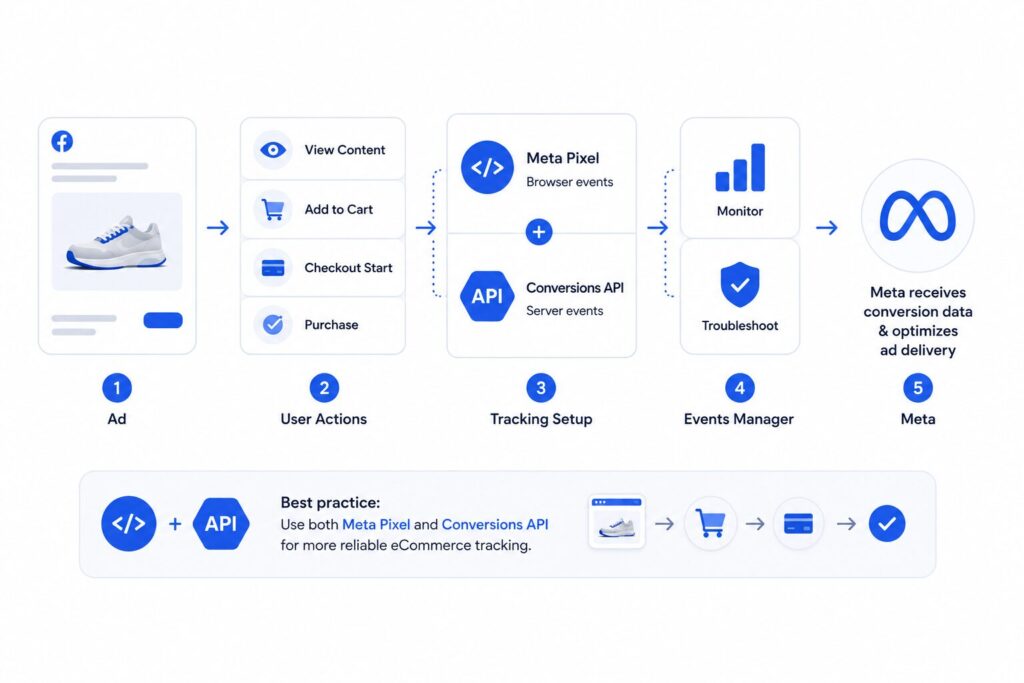
For eCommerce brands, this means connecting ad interactions with actions such as product views, add-to-carts, checkout starts, and purchases. This data helps you understand which campaigns generate orders and revenue while giving Meta the conversion signals it needs to optimize ad delivery.
Facebook Ads tracking typically relies on several components:
- Meta Pixel tracks actions that happen in the browser.
- Conversions API (CAPI) sends conversion data directly from your server or eCommerce platform to Meta.
- Events Manager helps monitor and troubleshoot eCommerce events.
- Attribution settings determine which purchases and revenue Meta credits to your ads.
For more reliable eCommerce tracking, most setups use both the Meta Pixel and Conversions API.
Why Facebook Ads Tracking Matters
Accurate tracking directly affects how eCommerce brands measure revenue, evaluate campaigns, and decide where to spend their advertising budget.
1. It Shows Which Ads Drive Purchases
Tracking connects orders to specific campaigns, ad sets, and ads. Without it, you may know that your store generated sales but have no reliable way to identify which ads contributed to those purchases.
2. It Makes CPA and ROAS More Reliable
Metrics such as cost per acquisition (CPA) and return on ad spend (ROAS) depend on accurate purchase and revenue data. Missing purchases can make campaigns look less profitable than they are, while duplicate or incorrect events can inflate performance.
3. It Helps Meta Optimize for Buyers
Meta uses purchase events and other eCommerce signals to identify people who are more likely to convert. Reliable data from actions such as ViewContent, AddToCart, InitiateCheckout, and Purchase gives the delivery system more information to optimize campaigns.
4. It Helps You Allocate Budget More Effectively
Accurate tracking makes it easier to identify which campaigns, products, audiences, and creatives generate profitable orders. This allows you to shift budget toward stronger performers instead of relying on clicks or surface-level engagement metrics.
5. It Gives You a Clearer View of Store Revenue
Comparing Meta data with your eCommerce platform helps you understand how much revenue Facebook Ads are actually contributing. This is especially important when Meta, GA4, and your store report different numbers.
Facebook Ads Tracking Methods
Facebook Ads tracking relies on several data sources that serve different purposes. Some send conversion data to Meta, while others help you validate attribution and compare reported results with actual eCommerce performance.
| Tracking Method | What It Tracks | Main Purpose |
| Meta Pixel | Browser-based actions such as product views, add-to-carts, checkouts, and purchases | Sends website behavior and conversion data to Meta |
| Conversions API | Events sent from your server or eCommerce platform | Improves data coverage and complements Pixel tracking |
| UTM Parameters | Campaign and traffic source data | Helps identify Facebook Ads traffic in analytics platforms |
| Analytics Platforms | Sessions, conversions, and customer journeys | Provides an independent view of campaign performance |
| eCommerce Platform / Backend | Orders, revenue, refunds, and customer data | Confirms actual business results beyond ad-platform attribution |
The most reliable setup uses these methods together rather than treating any single platform as the only source of truth.
How to Set Up Facebook Ads Tracking
A proper Facebook Ads tracking setup should capture eCommerce events in Meta, preserve campaign data in your analytics tools, and give you a way to compare attributed results with actual orders and revenue.
1. Create and Install the Meta Pixel
Go to Meta Events Manager, connect a web data source, and set up your Meta Pixel. You can install it manually, through Google Tag Manager, or with a native eCommerce integration such as Shopify or WooCommerce. After installation, confirm that the Pixel loads on the correct pages.
2. Set Up eCommerce Events
Configure the events that represent key steps in the purchase journey. Most eCommerce stores should track ViewContent, AddToCart, InitiateCheckout, and Purchase. For Purchase events, send accurate parameters such as value, currency, and content IDs so Meta can measure attributed revenue and ROAS correctly.
3. Configure Conversions API
Set up Conversions API (CAPI) so eCommerce events can also reach Meta from your server or commerce platform. For many eCommerce platforms, a native partner integration is the simplest option, although manual and server-side implementations are also possible. When the same event reaches Meta through both Pixel and CAPI, use the same event_id so Meta can deduplicate it.
4. Add Consistent UTM Parameters
Add UTM parameters to every ad URL so you can identify Facebook Ads traffic outside Meta Ads Manager. A simple structure might look like utm_source=facebook & utm_medium=paid_social & utm_campaign={{campaign.name}} & utm_content={{ad.name}}. Keep the same structure across campaigns so your reports remain consistent.
5. Test Events Before Launch
Use Test Events and Diagnostics in Meta Events Manager to confirm that your eCommerce events reach Meta with the expected parameters. Check for duplicate events, missing purchase values, incorrect URLs, and browser and server events that fail to match.
6. Check Event Match Quality and Deduplication
Review Event Match Quality in Events Manager and confirm that Pixel and CAPI events deduplicate correctly. Make sure your setup sends the relevant customer information parameters that your business can lawfully collect and share with Meta.
7. Verify Meta Data Against Store Data
Compare purchases and revenue in Meta Ads Manager with your eCommerce platform or backend. You can also use GA4 conversion tracking to compare how conversions are recorded across your measurement stack. The numbers will rarely match exactly because attribution logic differs between systems, but large or sudden discrepancies can indicate a tracking problem.
Understanding Facebook Ads Attribution
Facebook Ads attribution determines which ad receives credit for a conversion. This directly affects the number of purchases and the amount of revenue you see in Meta Ads Manager.
| Attribution Type | What It Means |
| Сlick-through attribution | Meta credits a conversion after someone clicks an ad and converts within the attribution window. |
| View-through attribution | Meta credits a conversion after someone sees an ad and converts without clicking it. |
| Attribution window | The period during which a conversion can still be credited to an ad interaction. |
Why Meta and GA4 Report Different Conversions
Meta and GA4 do not attribute conversions in the same way. Meta attributes conversions based on interactions with Meta ads and the applicable attribution settings, while GA4 applies its own attribution model across eligible traffic sources. Because of this, the same purchase may receive credit in Meta Ads Manager while GA4 assigns some or all of the credit to another channel.
How to Use Attribution Data
Do not expect every platform to report identical numbers. Use Meta Ads Manager to evaluate how Meta campaigns perform within the platform, use GA4 or another analytics tool to understand the wider customer journey, and use your eCommerce platform or backend to confirm actual orders and revenue.
Facebook Ads Tracking and Performance Metrics to Monitor
Once your tracking setup works, monitor both campaign performance and data quality. Together, these metrics help you understand whether your ads drive profitable eCommerce results and whether Meta receives reliable conversion data.
| Metric | What It Shows | Why It Matters |
| Cost per Purchase | How much you spend to generate one order | Shows whether customer acquisition is efficient |
| Return on Ad Spend (ROAS) | How much attributed revenue you generate for each dollar spent | Helps evaluate campaign profitability |
| Purchase Conversion Value / Attributed Revenue | Total revenue Meta attributes to your ads | Shows campaign contribution beyond order volume |
| Purchase Volume | Number of purchases attributed to your campaigns | Helps identify shifts in conversion performance |
| Average Order Value (AOV) | Average revenue per order | Helps explain ROAS changes when purchase volume stays similar |
| Event Match Quality | How effectively Meta can match events with users | Helps assess the quality of event data available for attribution and optimization |
| Landing Page Views vs Link Clicks | How many ad clicks result in an actual page load | Large gaps can point to page speed, accidental clicks, or tracking issues |
| Meta Attributed Revenue vs Store Revenue | Difference between Meta attributed revenue and actual store revenue | Helps identify attribution gaps and potential tracking problems |
Do not evaluate these metrics in isolation. Compare Meta performance data with actual orders and revenue from your eCommerce platform to get a more reliable view of campaign results.
Common Facebook Ads Tracking Problems and How to Troubleshoot Them
Even with a solid setup, Facebook Ads tracking can break or become less reliable. The most common issues usually involve missing events, duplicate conversions, incorrect values, or discrepancies between Meta and your eCommerce data.
| Problem | How to Troubleshoot It |
| Missing or incomplete conversion data | Use Test Events in Meta Events Manager to check whether key eCommerce events such as ViewContent, AddToCart, InitiateCheckout, and Purchase are being received. Review browser restrictions, consent settings, Pixel installation, and CAPI configuration if events are missing. |
| Duplicate events | Check whether the same Purchase event is being sent through both the Pixel and Conversions API. Make sure both versions use the same event_id so Meta can deduplicate them correctly. |
| Incorrect purchase values | Compare the value and currency sent with the Purchase event against actual orders in your eCommerce platform. Confirm that taxes, discounts, shipping, and currency are handled consistently. |
| Low Event Match Quality | Review Event Match Quality in Events Manager and identify which customer information parameters your setup sends through CAPI. Make sure your business can lawfully collect and share them with Meta. Relevant parameters such as email, phone number, browser ID, and click ID can improve event matching. |
| Meta and GA4 show different results | Compare attribution settings before assuming there is a tracking problem. Meta and GA4 use different attribution logic, so some discrepancy is expected. Use your eCommerce platform or backend to confirm actual orders and revenue. |
| Events fire at the wrong time | Test the complete customer journey and confirm that each event fires only after the intended action occurs. A Purchase event, for example, should trigger only after an order is successfully completed. |
| Missing or incorrect UTM parameters | Open your live ad URLs and confirm that the expected UTM parameters are present. Keep the same naming structure across campaigns so traffic can be identified consistently in GA4 and other analytics tools. |
| Sudden drops in tracked conversions | Check whether your website, checkout, theme, consent banner, Pixel integration, or CAPI setup changed recently. Then compare the timing of the tracking decline with those changes to identify the likely cause. |
The fastest way to troubleshoot Facebook Ads tracking is to compare Meta Events Manager, Ads Manager, GA4, and your eCommerce platform together. If your store records an order but Meta does not receive a Purchase event, the issue is likely related to event tracking. If Meta receives the event but does not attribute it to an ad, the issue is more likely related to attribution or event matching.
Facebook Ads Tracking Best Practices
Once your tracking setup works correctly, the main goal is to keep the data consistent enough for reliable eCommerce decisions over time. These practices focus on management and interpretation rather than setup.
Use Consistent Names Across Campaigns
Keep campaign, ad set, ad, and UTM names consistent so you can compare performance across Meta, GA4, and your eCommerce reports. A clear naming structure also makes historical analysis easier as your account grows.
Separate Attribution Data From Business Results
Treat Meta data as an attribution layer, not as a replacement for your store data. Use Meta to understand which campaigns receive credit for purchases, but use your eCommerce platform to confirm actual orders, revenue, refunds, and customer activity.
Evaluate Results Across Consistent Time Periods
Daily results can fluctuate because of attribution delays, conversion lag, and changes in customer behavior. Compare performance across consistent reporting periods before you make major budget decisions.
Keep Metric Definitions Consistent
Define key metrics such as revenue, cost per purchase, ROAS, and new customer acquisition in advance. Decide whether your reports include taxes, shipping, discounts, refunds, and repeat customers so every platform and team member uses the same logic.
Review Tracking After Major Store Changes
Major changes to your eCommerce setup can affect measurement. Recheck your reports after updates to checkout flow, product pages, payment methods, consent settings, tracking apps, or analytics integrations, even if your campaigns stay the same.
Document Your Tracking Setup
Keep a simple record of the events you track, the platforms that receive them, your UTM structure, and the source you use to validate revenue. This makes future troubleshooting easier and reduces the risk of inconsistent tracking after website or ad account updates.
Use One Primary Source for Each Decision
Do not use every platform for the same purpose. Use your eCommerce platform or backend as the primary source for actual orders, refunds, and revenue, Meta Ads Manager for Meta campaign attribution, and GA4 or another analytics tool for broader traffic and cross-channel analysis. This creates a clearer decision framework when platforms report different numbers.
FAQ
For most eCommerce stores, using both is the preferred setup. The Meta Pixel collects browser-based events, while Conversions API sends server-side data to Meta. Together, they provide broader data coverage and reduce reliance on browser tracking alone.
Meta and GA4 use different attribution rules, identity signals, and conversion logic. Meta may credit a purchase after an ad click or view, while GA4 may assign the same purchase to another channel. Some difference between the two platforms is normal.
Meta reports attributed revenue, while your eCommerce platform records actual transactions. Attribution windows, duplicate events, refunds, cancellations, taxes, shipping, and delayed conversions can all create differences between the two numbers.
No measurement system captures every customer journey perfectly. Privacy controls, attribution rules, browser limitations, consent choices, cross-device behavior, and differences between platforms can all affect reported results. The goal is consistent data that is reliable enough for business decisions.
Build a More Reliable Facebook Ads Tracking Setup
Reliable Facebook Ads tracking helps eCommerce brands understand which campaigns drive purchases, revenue, and profitable growth. The key is to combine accurate event tracking with consistent attribution and store data.
Need help with your Facebook Ads data, attribution, or campaign measurement? Come to VIDEN Growth. We can help you build a reliable setup and make better decisions from your Meta Ads data.