TikTok Shop is projected to generate over $112 billion in global GMV in 2026, with analysts expecting continued double-digit growth through 2027 and 2028 as the platform strengthens its position in social commerce.
Despite this rapid growth, many eCommerce businesses struggle to launch and scale TikTok Shop successfully. From account setup and product optimization to content strategy and fulfillment, even small mistakes can limit visibility, reduce conversions, and slow long-term growth.
This TikTok Shop setup guide explains how to set up TikTok Shop from scratch, optimize your store for conversions, and implement proven strategies to scale your business and maximize revenue in 2026 and beyond.
What Is TikTok Shop and How Does It Work?
TikTok Shop is an in-app eCommerce platform that allows businesses to sell products directly on TikTok. Users can discover products, browse listings, and complete purchases without leaving the app, creating a seamless shopping experience.
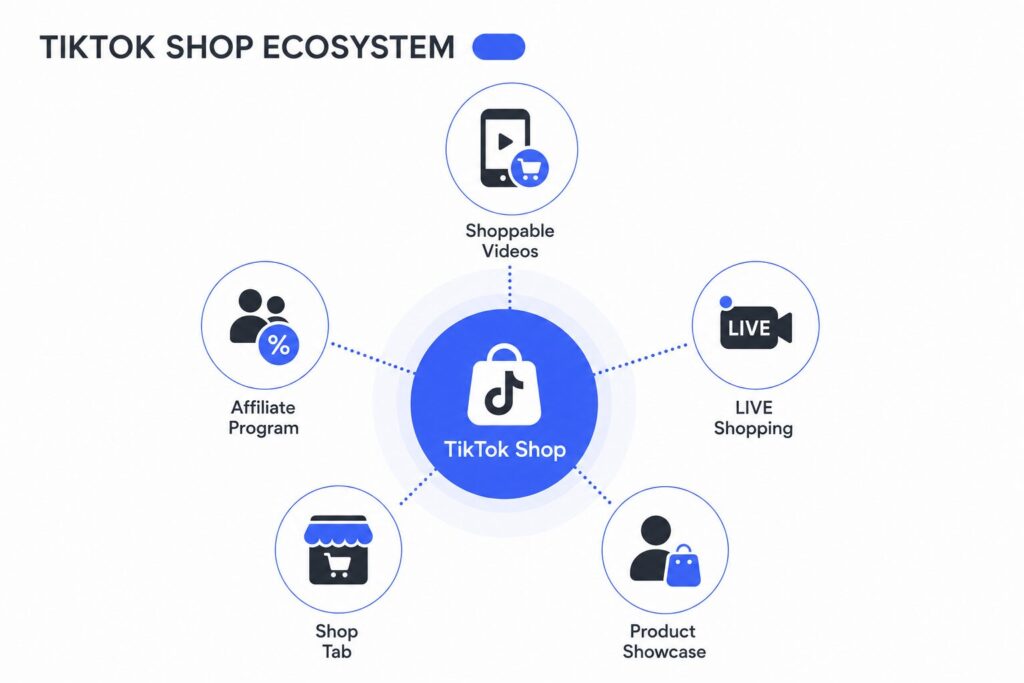
Businesses can promote and sell products through several built-in shopping features:
- Shoppable Videos: Tag products in short-form videos so viewers can buy instantly.
- LIVE Shopping: Showcase and sell products during livestreams with real-time audience interaction.
- Product Showcase: Display your product catalog on your TikTok profile.
- Shop Tab: List products in TikTok’s marketplace, where users can discover items based on personalized recommendations.
- Affiliate Program: Partner with creators who promote your products and earn commissions on successful sales.
Unlike traditional marketplaces, TikTok Shop is powered by content discovery. Its recommendation algorithm helps brands reach potential customers through engaging videos, livestreams, creator partnerships, and paid ads, making it a powerful channel for driving both product discovery and conversions.
Need help driving more sales through TikTok Shop? Our TikTok Ads management services help eCommerce brands launch high-performing campaigns that turn views into customers.
TikTok Shop Requirements for Sellers
Before creating a TikTok Shop, make sure you meet the platform’s eligibility requirements. While specific criteria vary by region, most sellers must satisfy the following conditions.
Supported Countries
TikTok Shop is available only in selected markets. As of 2026, supported regions include the United States, the United Kingdom, Spain, Ireland, France, Germany, Italy, Mexico, Brazil, Japan, and several Southeast Asian countries, with availability continuing to expand. Check the official TikTok Shop Seller Center to confirm whether your country is supported before registering.
Business vs. Individual Accounts
TikTok Shop accepts both business and individual sellers in eligible markets. Business accounts are typically required to provide company registration details and tax information, while individual sellers usually verify their identity with government-issued documents. Requirements vary by country.
Required Documents
To verify your seller account, you’ll generally need to provide:
- Government-issued photo ID
- Business registration certificate (for business accounts)
- Tax identification number, where applicable
- Business address and contact information
- Bank account details for payouts
Product Restrictions
Not every product can be sold on TikTok Shop. Prohibited or restricted categories generally include:
- Counterfeit or infringing products
- Weapons and hazardous materials
- Tobacco, vaping products, and alcohol
- Prescription medications and certain healthcare products
- Adult products and services
- Live animals and illegal goods
How to Set Up a TikTok Shop Account (Step-by-Step)
A successful TikTok Shop requires more than basic registration. You need to verify your business, create compliant product listings, configure payments and fulfillment, connect your TikTok account, and prepare a clear launch plan.
Requirements vary by market, but most sellers can follow the process below.
Step 1: Register and Verify Your Seller Account
Create an account through the TikTok Shop Seller Center for your market. Select your business location and choose whether you want to register as an individual seller or a company.
Enter your legal name, address, and contact details exactly as they appear in your official documents. Even small differences may delay approval.
TikTok also requires identity or business verification before you can list products and receive payouts.
| Seller Type | Typical Documents |
| Individual Seller | Government-issued ID, proof of address, tax details, and bank account information |
| Business Seller | Registration certificate, company details, tax ID, representative’s ID, and business bank account information |
Submit clear, valid, and current documents. Check Seller Center during the review process in case TikTok requests additional information.
Step 2: Complete Your Shop Profile and Connect TikTok
After approval, add your shop name, logo, description, customer service details, warehouse address, and return address.
Your store name and visual identity should match your website, social profiles, and product packaging. Consistent branding helps customers recognize your business and trust the shop.
Next, link the TikTok profile that will promote your products. The connection allows you to:
- Display products on your profile
- Tag products in short-form videos
- Sell products during livestreams
- Send viewers directly to product pages
Use a dedicated brand account where possible. Add a clear bio, recognizable profile image, and several useful or entertaining posts before you begin direct product promotion.
Step 3: Add and Organize Your Products
You can add products manually, upload them in bulk, or import them from a supported eCommerce platform. TikTok reviews each listing against its product and content policies before publication.
| Listing Element | Best Practice |
| Product Title | Name the product clearly and include the primary keyword naturally |
| Description | Lead with the main benefit, then explain features and specifications |
| Images and Video | Show the product from several angles and demonstrate real use |
| Variations | Add all available sizes, colors, models, or bundles |
| Price and Inventory | Keep prices and stock levels accurate |
| Shipping Details | Enter the correct weight, dimensions, and package information |
| Compliance Details | Add required warnings, certificates, or category documents |
Avoid misleading images, unsupported claims, and descriptions that do not match the actual product. These issues can result in rejected listings, refunds, or account penalties.
If your catalog is large, launch with a focused selection. Choose products that are easy to demonstrate, visually distinctive, and suitable for short-form video.
Step 4: Optimize Your Product Listings
Well-optimized product listings improve both visibility and conversions. Since TikTok recommends products based on user interests and engagement, your listing should communicate the product’s value at a glance.
Before publishing a product, make sure it includes:
- A clear, keyword-rich title that accurately describes the product
- A benefit-focused description followed by key features and specifications
- High-quality images that show multiple angles, important details, and the product in use
- A short product video that demonstrates how the product works or solves a problem
- Complete product information, including variations, dimensions, materials, sizing, or compatibility where applicable
Avoid misleading images, exaggerated claims, or descriptions that don’t match the actual product. These issues can lead to rejected listings, customer complaints, and higher return rates.
If you’re launching a large catalog, start with a smaller selection of products that are visually appealing and easy to demonstrate. Once you identify your best-performing items, you can gradually expand your assortment.
Step 5: Configure Fulfillment, Shipping, and Returns
Choose a fulfillment method based on your order volume, available resources, and target markets.
| Fulfillment Option | Best for | Main Advantage | Main Limitation |
| Self-Fulfillment | New or low-volume shops | Full control over inventory and packaging | Requires more time and resources |
| Third-Party Logistics (3PL) | Growing brands | Scalable storage and order processing | Additional service costs |
| TikTok-Supported Fulfillment | Eligible sellers and markets | Simplified shipping and returns | Limited availability |
Next, configure your warehouse location, shipping regions, delivery methods, handling times, package details, and return address.
Before launching, test your fulfillment workflow to ensure orders, inventory, tracking, and returns work as expected. Reliable shipping and responsive customer support help maintain a strong seller rating and reduce disputes.
Step 6: Set Up Payments and Pricing
After adding your bank account, review TikTok Shop’s fees and estimate the total cost of each order. If you plan to invest in paid campaigns, it’s also important to understand how much TikTok Ads cost before setting your marketing budget.
| Cost Category | Examples |
| Product | Manufacturing or supplier costs |
| Platform | TikTok Shop commissions and transaction fees |
| Fulfillment | Storage, packaging, shipping, and returns |
| Marketing | Ads, affiliate commissions, discounts |
Before publishing your products, confirm that:
- Your payout account is verified
- Product prices cover all operating costs
- Your target profit margin remains sustainable after fees and shipping
Step 7: Prepare Content and Affiliate Partnerships
Before launching your shop, prepare several videos that showcase your products from different angles, answer common questions, or demonstrate real use cases. Content that feels authentic and entertaining typically performs better than traditional ads.
You can also join the TikTok Shop Affiliate Program to collaborate with creators who promote your products in exchange for a commission. When choosing affiliates, focus on audience relevance and engagement rather than follower count alone.
Step 8: Test, Launch, and Track Results
Before promoting your shop, review the entire customer journey. Test product pages, checkout, shipping options, tracking, and returns to ensure everything works as expected.
Launch with a small selection of products and monitor key performance metrics to identify what drives sales.
| KPI | What It Shows |
| Product views | Listing visibility |
| Click-through rate | Interest generated by your content |
| Conversion rate | Percentage of visitors who purchase |
| Average order value | Revenue per order |
| Refund rate | Product or fulfillment issues |
| Return on ad spend (ROAS) | Advertising performance |
Use the results to optimize your products, content, and campaigns before scaling your TikTok Shop.
How to Drive Traffic to TikTok Shop
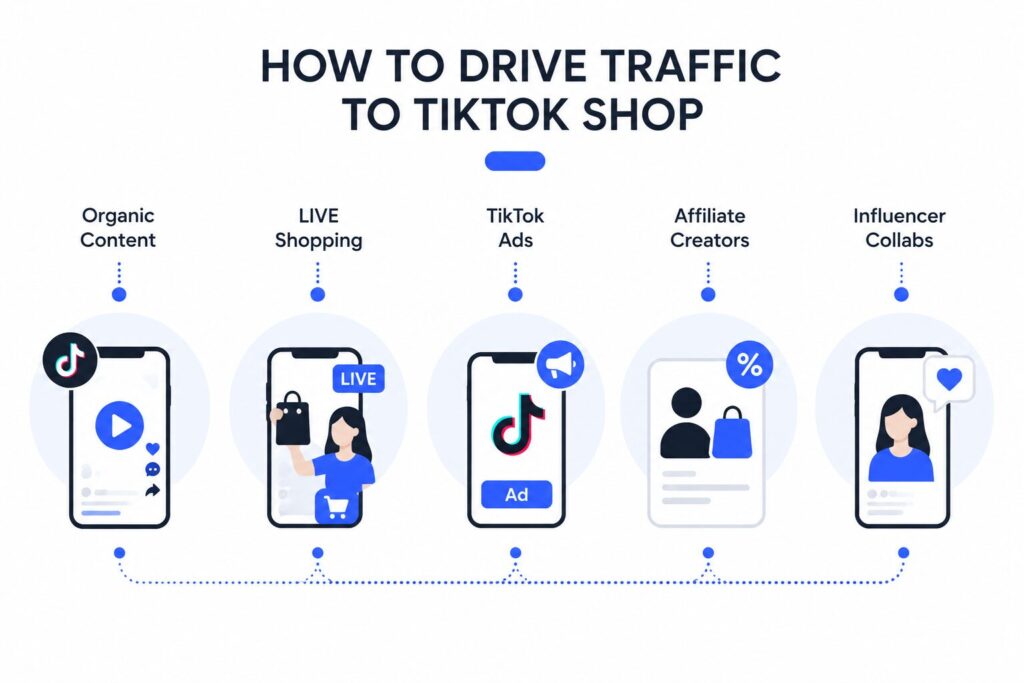
A successful TikTok Shop relies on multiple traffic sources. Instead of depending on a single tactic, combine organic content, paid campaigns, and creator partnerships to maximize reach and sales.
- Organic content: Publish videos consistently, focus on product demonstrations, tutorials, customer pain points, and trending formats, and tag products to create a direct path to purchase.
- LIVE Shopping: Host livestreams to showcase products, answer customer questions, and encourage purchases through pinned product links and exclusive offers.
- Retargeting: Use TikTok Shop Ads, including GMV Max campaigns, to retarget users who viewed products, watched your videos, or added items to their cart but didn’t complete the purchase. Personalized offers, limited-time discounts, and dynamic product ads can help recover lost sales and increase customer lifetime value.
- Affiliate creators: Join the TikTok Shop Affiliate Program to let creators promote your products for a commission. Prioritize creators with relevant audiences and strong engagement.
- Influencer partnerships: Collaborate with influencers to build brand awareness and social proof, then repurpose high-performing creator content for your own organic posts and paid ads.
How to Scale TikTok Shop Sales
Once your TikTok Shop starts generating consistent sales, the next step is to improve efficiency and increase revenue without significantly raising operating costs. Focus on the following areas to build a scalable sales strategy.
Automation
As order volume grows, manual processes become difficult to manage. Use automation tools to sync inventory, process orders, update product catalogs, and manage customer communications. This reduces errors, saves time, and allows your team to focus on growth.
Inventory Management
Maintain accurate inventory levels to prevent overselling and stockouts. Track your best-selling products, forecast demand based on historical sales, and replenish inventory before peak shopping periods. If you sell across multiple channels, use inventory management software to keep stock synchronized.
Cross-Border Selling
Expand into new TikTok Shop markets as they become available. Before entering a new region, review local regulations, product restrictions, taxes, shipping costs, and customer preferences. Localize product listings and marketing content to improve customer trust and conversion rates.
Analytics and KPIs
Track performance regularly to identify opportunities for optimization. Pay close attention to metrics such as product views, click-through rate, conversion rate, average order value, refund rate, and return on ad spend (ROAS). These insights help you refine product listings, content, and advertising campaigns.
Retargeting
Not every visitor will purchase on their first interaction. Use TikTok Shop Ads to retarget users who viewed products, watched your videos, or added items to their cart but didn’t complete the purchase. Personalized offers, limited-time discounts, and dynamic product ads can help recover lost sales and increase customer lifetime value.
Common TikTok Shop Mistakes to Avoid
Avoiding common mistakes can help you improve visibility, increase conversions, and build a sustainable TikTok Shop business.
- Treating TikTok Shop like a traditional marketplace. Simply listing products isn’t enough to generate sales. Publish engaging videos regularly, host LIVE Shopping events, and collaborate with creators to keep your products visible in users’ feeds.
- Using poorly optimized product listings. Incomplete titles, low-quality images, and vague descriptions can reduce both visibility and conversions. Optimize every listing with keyword-rich titles, compelling descriptions, high-quality visuals, and accurate product details.
- Relying on a single traffic source. Depending only on organic content or paid ads limits your growth potential. Combine organic videos, TikTok Shop Ads, affiliate creators, influencer partnerships, and livestreams to build a diversified traffic strategy.
- Ignoring customer experience. Slow shipping, delayed responses, and inaccurate inventory can hurt your seller rating. Maintain accurate stock levels, fulfill orders on time, and provide fast, helpful customer support.
- Scaling too quickly. Increasing ad spend or expanding your catalog before validating your products can waste budget and create operational challenges. Start with a small selection, analyze performance, and scale only the products and campaigns that consistently generate profitable sales.
- Failing to monitor performance. Without tracking key metrics, it’s difficult to identify opportunities for improvement. Review KPIs such as conversion rate, average order value, refund rate, and ROAS regularly, then use the data to optimize your listings, content, and advertising campaigns.
Final Thoughts
TikTok Shop offers significant growth opportunities, but success depends on more than launching a store. A strong content strategy, optimized product listings, and continuous performance tracking are key to driving sustainable sales.
Need expert support? VIDEN Growth helps eCommerce brands launch, optimize, and scale TikTok Shop with data-driven strategies and performance marketing. Contact our team to see how we can help grow your business.
FAQ
TikTok Shop is an in-app eCommerce platform that allows businesses to sell products directly on TikTok. Users can discover, browse, and purchase products through videos, livestreams, creator content, and the Shop tab without leaving the app.
To get TikTok Shop, register through the TikTok Shop Seller Center in an eligible country. After creating an account, complete identity or business verification, connect your TikTok account, configure payments and shipping, and upload your products before launching your store.
Yes, TikTok Shop is generally safe to use. The platform offers secure in-app checkout, order tracking, and customer support. However, shoppers should still check seller ratings, product reviews, and return policies before making a purchase.
To setup TikTok Shop to sell products, register through the TikTok Shop Seller Center, complete account verification, connect your TikTok account, configure payment and shipping settings, and upload your products.
To sell on TikTok Shop, create and verify a seller account, upload optimized product listings, configure shipping and payment settings, and connect your TikTok profile. You can then promote products through shoppable videos, LIVE Shopping, TikTok Shop Ads, and affiliate creators to drive sales.