Shopify accounts for more than 14% of U.S. eCommerce sales, which shows how significant the platform has become in the online retail market. With millions of stores that compete for attention, a Shopify website alone is rarely enough to attract customers.
Paid ads can drive traffic quickly, but Google, Meta, and TikTok each require a different approach. Without a clear strategy, brands can easily waste ad spend on clicks that do not convert.
In this guide, we’ll explain how Shopify ads work across Google, Meta, and TikTok, how to set up campaigns on each platform, and how to measure and improve their performance to increase traffic, conversions, and revenue for your eCommerce store.
What Are Shopify Ads?
Shopify ads usually refer to paid advertising campaigns that promote a Shopify store through platforms such as Google, Meta, and TikTok. These campaigns help merchants reach potential customers outside Shopify and direct them to product pages, collections, or other store pages.
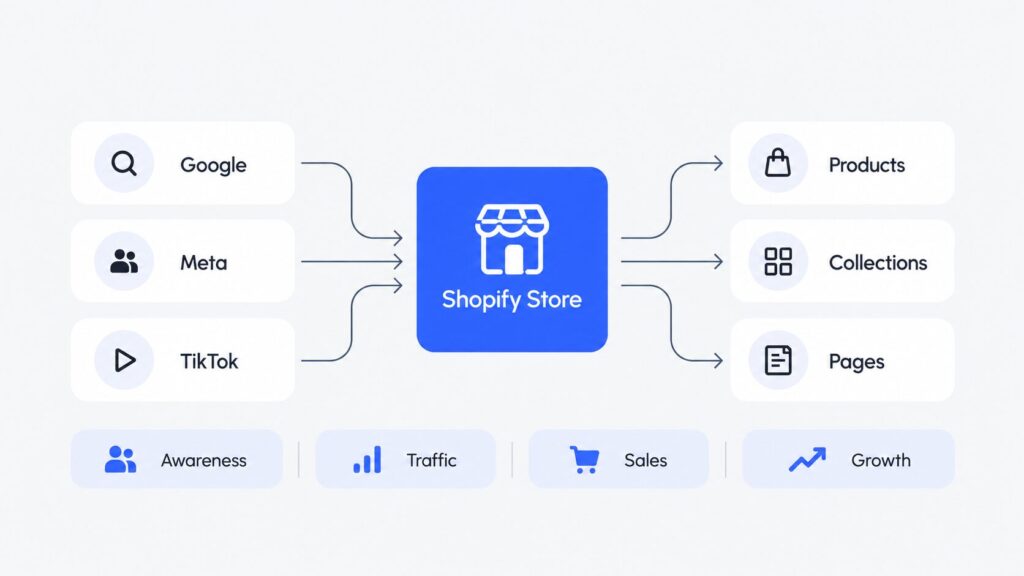
The term covers different ad formats and channels, from search and shopping ads on Google to social ads on Facebook, Instagram, and TikTok. The right option depends on where your audience spends time and how they search for or discover products.
Shopify Ads vs. Shop Campaigns
Shopify ads and Shop Campaigns are not the same thing. Shopify ads usually refers to campaigns run through external ad platforms such as Google Ads, Meta Ads, and TikTok Ads, while Shop Campaigns are a separate Shopify advertising product within the Shop ecosystem.
In this guide, we’ll focus on Google, Meta, and TikTok ads for Shopify stores.
Google vs. Meta vs. TikTok Ads for Shopify
Google, Meta, and TikTok can all help Shopify stores attract customers, but each platform serves a different purpose. Google captures existing demand, while Meta and TikTok help brands reach people before they actively search for a product.
| Platform | Best For | Customer Intent | Main Ad Formats | Creative Needs | Best Fit |
| Capture existing demand | High | Shopping, Search, Performance Max | Product feed, images, ad copy | Products people already search for | |
| Meta | Reach and convert broad audiences | Medium | Feed ads, Reels, catalog ads | Images, video, UGC | Most eCommerce categories |
| TikTok | Product discovery | Low to medium | Spark Ads, Catalog Ads, Smart+ | Native short-form video | Visual products that are easy to demonstrate |
As a general rule:
- Choose Google Ads if customers already search for products like yours.
- Choose Meta Ads if you want broad reach, flexible audience options, and support for both acquisition and retargeting.
- Choose TikTok Ads if your product has strong visual appeal or works well in short videos, demonstrations, or creator-style content.
You do not need to use all three platforms at once. Your best option depends on your product, audience, budget, and goals. Next, we’ll look at how to prepare your Shopify store before you launch ads.
How to Prepare Your Shopify Store for Ads
Before you spend money on ads, make sure your Shopify store is ready to convert traffic and provide accurate data to Google, Meta, and TikTok. A few basic checks can help you avoid wasted spend, tracking issues, and problems after customers click your ads.
- Check your product pages and checkout. Make sure product information, prices, images, shipping details, and return policies are clear. Test the mobile experience, add-to-cart flow, and checkout for errors.
- Set up conversion tracking. Confirm that your ad platforms can record key actions such as product views, add-to-cart events, checkout starts, and purchases.
- Prepare your product catalog. Review product titles, descriptions, prices, availability, images, and variants so your feed data is complete and accurate.
- Confirm inventory and fulfillment. Make sure the products you plan to advertise are in stock and that your shipping times and fulfillment process can support additional orders.
- Review store policies and contact details. Check that your return, refund, privacy, and contact information is complete, accurate, and easy to find.
How to Run Google Ads for Shopify
Google Ads can help Shopify stores reach people who already search for relevant products or categories. The setup comes down to four steps: connect your store, choose a campaign type, set your budget and targeting, and measure performance after launch.
1. Connect Shopify to Google
Install the Google & YouTube sales channel in Shopify, then connect your Google Merchant Center and Google Ads accounts. Shopify can sync your product data with Google, which makes your product feed a key part of the setup.
Before you launch ads, check that your feed has:
- Accurate product titles and descriptions
- Correct prices and availability
- High-quality images
- Complete variant details
Google uses this data to match products with relevant searches, so incomplete or inaccurate information can limit ad visibility.
2. Choose the Right Google Ads Campaign
The best campaign type depends on how you want to reach customers and how much control you need.
| Campaign Type | How It Works | Best For |
| Standard Shopping | Uses Merchant Center product data to show Shopping ads with product details | Products with clear existing search demand |
| Performance Max | Uses product data and creative assets across Google inventory | Broad reach across multiple Google placements |
| Search | Uses keywords and text ads to target specific searches | High-intent product, category, and brand queries |
For many eCommerce stores, Standard Shopping or Performance Max can serve as the main campaign type, while Search campaigns can support specific high-intent queries.
3. Set Your Budget and Targeting
Set a daily budget based on your margins, average order value, and target acquisition cost rather than the number of clicks you want. Then define where you want ads to appear and which products or searches deserve priority. Depending on the campaign type, this can include locations, languages, product groups, keywords, and audience or search signals.
Avoid broad expansion at the start. A focused campaign usually gives you clearer data about which products and audiences generate profitable sales.
4. Launch and Measure Your Campaign
Before launch, confirm that purchase conversion tracking works, your Merchant Center products have approval, and the information on your landing pages matches your product feed.
After launch, focus on four core metrics:
- Conversions — how many purchases the campaign generates
- Cost per acquisition (CPA) — how much you pay for each conversion
- Conversion value — how much revenue the campaign generates
- ROAS — how much revenue you earn for each dollar of ad spend
Also check Merchant Center for product errors or disapprovals. Once you have enough data, adjust your budget, product selection, keywords, bids, or creative assets based on sales performance.
How to Run Meta Ads for Shopify
Meta Ads let Shopify stores promote products across Facebook and Instagram and reach customers at different stages of the purchase journey. The setup includes six main steps: connect your store, configure conversion data, choose a campaign, define your audience, create ads, and set your budget.
1. Connect Shopify to Facebook and Instagram
Add the Facebook & Instagram by Meta sales channel in Shopify and connect the Meta assets associated with your business. Shopify can then sync eligible products with your Meta catalog.
Make sure you have:
- A Facebook Page
- A Meta business portfolio
- A Meta ad account
- An Instagram professional account if you plan to advertise on Instagram
- A product catalog with the products you want to promote
2. Set Up Meta Pixel and Conversions API
Connect a Meta Pixel through Shopify and enable the appropriate customer data settings. Meta Pixel and Conversions API send events such as product views, add-to-cart actions, and purchases to Meta, which helps you measure campaign results and gives Meta more data for ad optimization. Test the events in Meta before you launch your campaign.
3. Choose a Sales Campaign
For most eCommerce stores, the Sales objective is the main choice because it focuses campaigns on purchase-related results.
| Option | What It Does | Best Use |
| Sales Campaign | Optimizes ads for purchase-related actions | Standard eCommerce campaigns |
| Catalog Ads | Pull products from your Meta catalog and show relevant items to users | Stores with multiple products or collections |
| Advantage+ Sales | Uses Meta automation across audiences, placements, and other campaign elements | Stores that want more automation and broader reach |
4. Define Your Audience
Meta can reach both new customers and people who already know your store. Separate these groups based on the role of each campaign.
| Audience | Who It Includes | Main Goal |
| Prospecting | People who have not purchased from your store | Acquire new customers |
| Retargeting | Store visitors, product viewers, cart users, and other warm audiences | Bring potential customers back |
| Advantage+ Audience | A broad audience that Meta can expand based on your campaign goal and inputs | Help Meta find more likely customers |
5. Create Your Meta Ads
Choose creative that fits both the product and placement. UGC-style videos can show the product in a natural context, product videos can demonstrate features or benefits, and static images can communicate a simple offer quickly. For Reels and Stories, use vertical creative and keep important text and product details within the visible area.
6. Set Your Budget and Launch
Set your budget based on product margins, average order value, and target acquisition cost rather than clicks or reach. Before launch, confirm that the correct products appear in your catalog, purchase events reach Meta, ads lead to the right Shopify pages, and your budget gives the campaign enough room to collect useful data. After launch, evaluate sales, CPA, conversion value, and ROAS.
How to Run TikTok Ads for Shopify
TikTok Ads help Shopify stores reach customers through short-form video and product-based ads. To start, connect your store, set up conversion data, choose an ad format, define your audience, prepare TikTok-first creative, and set your budget.
1. Connect Shopify to TikTok
Install the TikTok app for Shopify, connect your TikTok Ads Manager account, and sync the products or collections you want to promote. The integration can keep product titles, prices, inventory, and images up to date as you make changes in Shopify.
Before you move on, confirm that:
- Your TikTok Ads Manager account is connected
- The correct products appear in your catalog
- Prices and stock levels match your Shopify store
2. Set Up TikTok Pixel and Events API
Enable data sharing through the Shopify TikTok integration and connect TikTok Pixel and Events API. These tools send events such as product views, add-to-cart actions, checkout starts, and purchases to TikTok so you can measure conversions and give the platform better data for campaign optimization.
3. Choose a TikTok Campaign Type
For Shopify stores focused on website purchases, choose the Sales objective and select Website as the sales destination. Some accounts may still show the legacy Website Conversions or Product Sales objectives while TikTok completes the rollout of its updated campaign flow.
From there, choose the campaign setup and ad solution that best match your products, creative assets, and level of automation.
| Option | How It Works | Best For |
| Spark Ads | Promote an existing TikTok post from your brand or a creator while the original engagement stays attached | Products with strong organic or creator content |
| Catalog Ads | Use your synced product catalog to create personalized ads with relevant products | Stores with multiple products or collections |
| Smart+ | Uses AI-powered automation across areas such as targeting, bidding, and creative optimization | Stores that want more automation and scale |
For Shopify stores that send customers to an external website, Smart+ Web Campaigns can optimize for website conversions, while Smart+ Catalog Ads combine Smart+ automation with product catalog data.
4. Define Your Audience
Choose an audience that matches your campaign goal. TikTok supports broad audiences, Custom Audiences based on customer or website data, Lookalike Audiences, and Smart Targeting, which gives the platform more freedom to find potential customers. You can also use separate campaigns to reach new customers and reconnect with previous store visitors.
5. Create TikTok-First Ads
Creative should feel natural in the TikTok feed rather than look like a traditional display ad. TikTok recommends content that captures attention quickly and shows the product clearly.
- Show the product or main benefit within the first few seconds
- Use vertical, short-form video that matches native TikTok content
- Add captions or text overlays to communicate key benefits
- Include a clear call to action that leads to the relevant Shopify page
6. Set Your Budget and Launch
Set a budget that matches your margins, average order value, and target acquisition cost. Before launch, confirm that conversion events work, product data is accurate, ads lead to the correct Shopify pages, and your creative meets TikTok requirements. After launch, evaluate purchases, CPA, conversion value, and ROAS, then increase spend on campaigns that produce profitable results.
How Much Should You Spend on Shopify Ads?
There is no single ad budget that works for every Shopify store. The right amount depends on your product margins, average order value, target cost per acquisition (CPA), and the platform you choose. Instead of starting with an arbitrary daily budget, first determine how much you can afford to pay for a new customer without losing profit.
Use these principles to set your initial budget:
- Calculate your target CPA. Estimate the maximum amount you can spend to acquire a customer based on your average order value and profit margin.
- Account for product margins. A store with higher margins can usually support a higher acquisition cost than one with narrow margins.
- Set a test budget. Allocate enough spend to collect useful conversion data before you judge campaign performance.
- Focus your budget. If your budget is limited, start with one or two platforms instead of dividing a small amount across Google, Meta, and TikTok.
- Scale after you prove profitability. Increase spend once a campaign produces sales at an acceptable CPA or ROAS.
Your platform mix should also reflect how customers discover your products. The examples below illustrate how a store might divide its ad budget:
| Store Type | Meta | TikTok | |
| Search-Driven Product | 60% | 30% | 10% |
| Visual Impulse Product | 15% | 50% | 35% |
| Balanced eCommerce Brand | 40% | 40% | 20% |
These percentages are examples, not fixed rules. Start with the channels that best match your customer intent and product type, then move more budget toward campaigns that deliver profitable sales.
How to Track Shopify Ad Performance
Once your campaigns are live, focus on metrics that show whether ads generate profitable sales, not just traffic. Google, Meta, and TikTok report many numbers, but these core metrics provide the clearest view of eCommerce performance.
| Metric | What It Shows | How to Use It |
| ROAS | Revenue generated for each dollar spent on ads | Compare campaign efficiency and assess whether ad spend supports your profit goals |
| CPA | Cost to acquire a customer or generate a purchase | Compare it with your target acquisition cost and product margins |
| Conversion Rate | Percentage of visitors who complete a purchase | Use it to assess traffic quality and identify issues with product pages or checkout |
| CTR | Percentage of people who click your ad | Use it as a signal of ad relevance and creative performance |
| CPC | Average cost of each ad click | Track traffic costs, but do not judge performance by cheap clicks alone |
| AOV | Average revenue per order | Use it to understand how much you can afford to spend to acquire a customer |
Keep in mind that Google, Meta, and TikTok may attribute the same purchase differently, so compare platform-reported results with Shopify or analytics data before you shift budget between channels.
How to Use Google, Meta and TikTok Ads Together
Google, Meta, and TikTok work best when each platform supports a different stage of the customer journey. Instead of treating them as separate channels, use them as parts of one funnel that moves shoppers from discovery to purchase.
A simple cross-channel setup can look like this:
- TikTok and Meta → Discovery. Reach new audiences with short-form video, UGC, product demonstrations, and broad prospecting campaigns.
- Meta → Consideration. Reconnect with people who viewed products, visited your store, or engaged with your ads but did not buy.
- Google Search and Shopping → High intent. Capture shoppers who later search for your brand, product category, or specific products.
- Meta and Google → Conversion. Bring high-intent visitors back with remarketing ads and product-focused campaigns.
For example, a customer may first discover a product through a TikTok video, visit the Shopify store through a Meta ad a few days later, and complete the purchase after a Google search. A cross-channel strategy lets each platform support the others rather than compete for the entire ad budget.
Common Shopify Ads Mistakes
Even a well-built campaign can underperform if the strategy around it is weak. These are some of the most common mistakes Shopify stores make with paid ads:
- Choosing the wrong platform for the product. Google works best when demand already exists, while Meta and TikTok can be stronger for discovery-driven products.
- Launching ads before the store is ready. Poor product pages, checkout issues, or unclear policies can waste paid traffic.
- Skipping conversion tracking. Without reliable purchase and event data, you cannot measure results accurately or optimize campaigns effectively.
- Using the same creative on every platform. An ad that works on Google may not suit Meta or TikTok, where format, placement, and user behavior differ.
- Splitting a small budget across too many campaigns. Too many campaigns can spread your spend too thin and make it harder to collect useful performance data.
- Focusing on clicks instead of profit. High CTR or low CPC does not matter if the campaign fails to generate profitable sales.
FAQ
Yes. Eligible merchants can create Shop Campaigns through the Shop channel in Shopify, with ads across Shop, the Shopify Product Network, and optional third-party placements. You can also connect Shopify with Google, Meta, and TikTok to sync products and support campaigns on those platforms.
There is no single best platform for every Shopify store. Google is often a strong choice for products with existing search demand, Meta suits brands that need broad reach and retargeting, and TikTok can work well for visually appealing products that customers discover through short-form content.
Shopify ad costs depend on the platform, competition, audience, product margins, and campaign goals. Instead of a fixed daily amount, set your budget around the maximum CPA you can afford and increase spend only when campaigns produce acceptable returns.
Yes. TikTok supports Shopify product catalog sync and ad formats such as Spark Ads, Catalog Ads, and Smart+. It can be particularly useful for products that are easy to demonstrate through short-form video and fit TikTok’s discovery-focused experience.
Start Advertising Your Shopify Store
The best ad platform for your Shopify store depends on your product, customer intent, and available creative. Google can capture existing demand, while Meta and TikTok can help you reach shoppers earlier in the purchase journey.
Not sure where to start? VIDEN Growth can help you choose the right channels, set up campaigns, and optimize your Shopify advertising for profitable growth.