
Every performance marketer knows the tax: before you can make a single smart decision, you spend hours exporting reports, stitching spreadsheets together, and re-running the same pivot tables you ran last week. The data is all there in Google Ads, it’s just slow and tedious to interrogate.
That experience is far from unique. According to Supermetrics’ 2026 Marketing Data Report, only 33% of marketers say they can effectively activate their marketing data. In this article, we’ll show how we tackled that problem.
We decided to fix that for ourselves. The result is a tool we’re now sharing with the whole industry.
From an Internal Tool To an Open One
We didn’t set out to build something for the industry, we built it to get our own team out of spreadsheets. The first version ran purely internally, and our marketers could just start asking questions with zero setup on their end. We still run that version today.
But that setup only works inside one team. To make it something any marketer or analyst could pick up, including in-house teams and clients managing their own accounts, we reworked it so each person connects with their own Google account and only ever sees the accounts they’re already allowed to access. That’s the version we’re now open-sourcing.
What We Built
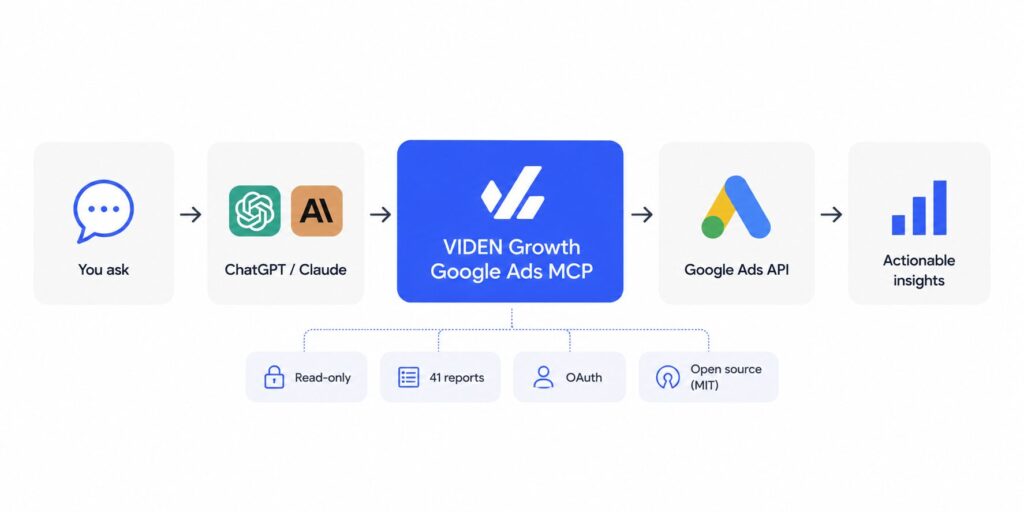
It’s a Model Context Protocol (MCP) connector for Google Ads: a bridge that lets an AI assistant (like Anthropic’s Claude or ChatGPT) talk directly to the Google Ads API and answer real questions about an account in plain language.
Under the hood, it exposes 41 read-only tools covering nearly everything a strategist looks at:
- Performance: campaigns, ad groups, keywords, ads, daily trends
- Search terms: the actual queries triggering your ads, and the wasted spend hiding in them
- Segments: geo, device, hour-of-day, age, gender, audiences
- Diagnostics: Quality Score, impression share, bid strategies, budget pacing, change history
- Performance Max: asset-group breakdowns most dashboards bury
Instead of clicking through five screens, you ask:
- “Find wasted spend in search terms.”
- “Compare device and geographic performance over the last 30 days.”
- “Is this account on pace to spend its budget this month?”
→ Get an answer with the underlying numbers in seconds.
Why Not Just Use Google’s Official Server?
Google does publish its own Google Ads MCP server, and we tried it. But it’s a low-level bridge: it ships with a handful of generic tools and expects you to hand-write a GAQL query (Google’s SQL-like query language) for every question you ask. That’s powerful if you’re an engineer who lives in GAQL, and a wall if you’re a marketer or analyst who just wants the answer.
In our own testing, it didn’t fit the way our team works day to day. So we built the layer that was missing: 41 purpose-built reports (search terms, Quality Score, budget pacing, geo/device/hour segments, Performance Max assets) that the AI can call directly, no query-writing required.
| Google’s official MCP server | VIDEN Growth connector | |
| Setup for a non-engineer | Requires hand-written GAQL for every question | Ask in plain language, no query writing |
| Built-in reports | A handful of generic tools | 41 purpose-built reports |
| Custom queries | Primary interface | Available as an escape hatch alongside the 41 tools |
| Access model | Varies by setup | Per-user OAuth, scoped to accounts you already have access to |
| Write access | None | None: strictly read-only |
| License | Open Source, Apache v2 | MIT, fully open source |
What We Designed Around
It’s read-only. The connector can look but never touch. It cannot pause a campaign, change a bid, or edit a budget. That’s a deliberate safety boundary: AI should accelerate analysis, with a human always making the call.
It’s open source. We released it under the MIT license. Anyone can read every line, audit exactly what it does with their data, run it themselves, or build on top of it. We believe tools that touch client budgets should be transparent, not black boxes.
It covers what marketers actually need day-to-day, with an escape hatch. The 41 built-in tools are shaped around the questions our own analysts ask every day. Don’t see the report you need? A custom GAQL query tool is built in for anything outside the standard set, and since it’s open source, you’re welcome to contribute the report back.
It’s token-efficient. Every tool is designed to hand the AI just the data needed to answer the question, not a raw, bloated API dump, so it stays fast and cheap to run even on large accounts.
Why This Matters For The Clients We Work With
This isn’t a gadget. It changes the shape of the work. When the mechanical part of analysis (pulling, joining, formatting data) drops to near zero, our team spends that time where it actually pays off: spotting the pattern, forming the hypothesis, and acting on it. Faster diagnosis, fewer things slipping through the cracks, and more strategy per hour.
Being “tech-driven” shouldn’t be a line on a pitch deck. For us it means we build the tools we wish existed, and when they’re good enough, we share them.
Frequently Asked Questions
Yes. The project is fully open source under the MIT License, so you can use it, modify it, and deploy it yourself.
Only after you authorize it through Google’s OAuth flow. The connector can only access the Google Ads accounts you already have permission to view.
No. The connector is intentionally read-only. It cannot create, edit, pause, or delete campaigns, change bids, or modify budgets.
The connector works with any MCP-compatible client, including ChatGPT and Anthropic’s Claude.
Google’s server provides a low-level connection to the API and expects users to write GAQL queries. Our connector adds 41 marketer-focused reports that AI can call directly, making analysis much faster for non-engineers.
Try It Yourself
The real opportunity isn’t asking AI to replace marketers. It’s removing the manual work that prevents marketers from doing their best thinking. That’s exactly why we built this connector. It doesn’t make decisions for you. It removes the friction between your questions and your data.
The connector is live on GitHub under the MIT license.
Want to see what this kind of analysis could surface in your Google Ads account? Get in touch, VIDEN Growth will walk you through it.